MongoDB Connector
With the deprecation of Atlas Device Sync, Ditto is the recommended replacement for synchronizing edge devices with MongoDB. Refer to our Migration Guide for Atlas Device Sync for a comprehensive guide on moving from Atlas Device Sync to Ditto.
The MongoDB Connector is currently in private preview and is likey to evolve further, prior to its full release.
You can sign up for the MongoDB Connector waitlist to request access to the preview!
The Ditto MongoDB Connector, built in partnership with MongoDB, provides seamless bidirectional synchronization between Ditto apps and MongoDB databases. It allows you to extend your data in MongoDB's developer platform to the edge via Ditto's powerful edge synchronization capabilities, effectively bridging the gap between edge and cloud data management.
How It Works
The MongoDB Connector is provided as a managed service, running alongside the Big Peer that you are using for your Ditto applications. The Big Peer is a centralized cloud datastore and synchronization engine that is analogous to the Atlas Device Sync service.
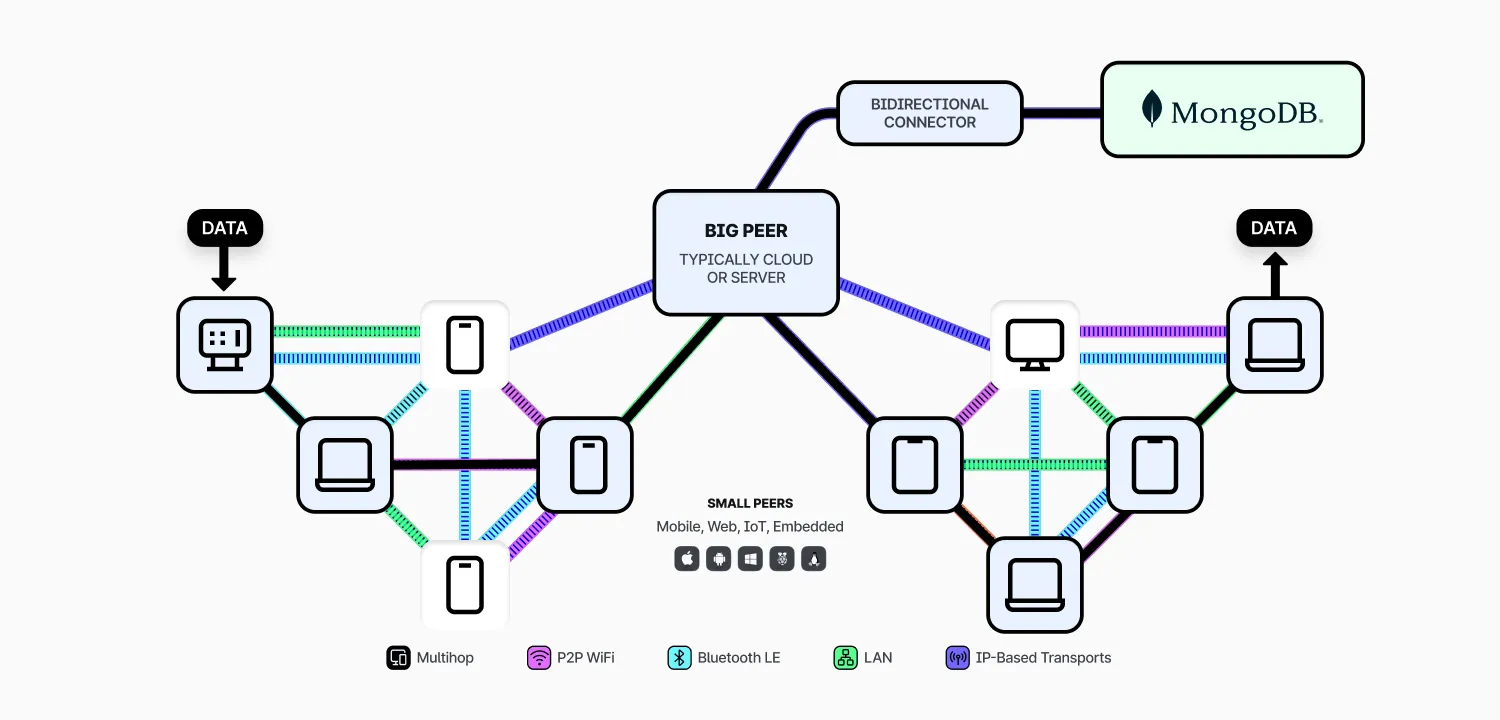
Only data currently stored within the Big Peer will be replicated to/from individual Small Peers (devices), so purpose of the connector is to synchronize data as it changes between MongoDB and the Big Peer.
To do this, the connector listens to changes to documents in both Ditto and MongoDB. When it detects a change to a document it then performs conflict resolution between the two systems and updates the document in the target system with the new value. This conflict resolution mechanism roughly models Ditto's causal consistency , ensuring that changes are not unexpectedly lost when mutations are made to the same documents in both MongoDB and Ditto simultaneously.
Unlike other synchronization systems for MongoDB, Ditto's advanced conflict resolution (based on CRDTs) avoid the need to deploy extra backend services to handle writes and conflicts, just deploy a Big Peer and you have everything you need to integrate with MongoDB.
Setting Up the Connector
To setup the connector, you first must carry out some steps within your MongoDB cluster, then configure the connector via API to launch the connector.
Pre-requisites
You need to have a MongoDB cluster already setup, the minimum supported version for the connector is currently MongoDB 7.0.13 and MongoDB 8.0.0.
You need to follow a number of steps to ensure that MongoDB is ready to be used with the connector.
Create MongoDB Database
If your target database doesn't currently exist, then you must first create this within MongoDB. No special configuration is required for the created database. An existing database can be used if one exists.
Create MongoDB Collections
All collections you wish to synchronize with Ditto must exist within MongoDB before setting up the connector. Each of these synchronized collections must have changeStreamPreAndPostImages set to true. This setting allows the connector to ensure causal consistency between both systems, and the connector will not start if this is not set for all collections.
When creating new collections, pass changeStreamPreAndPostImages: true to your creation command. For pre-existing collections, you can modify this configuration using collMod.
For example, using mongosh as user with appropriate permissions:
db.runCommand({ collMod: <collectionName>, changeStreamPreAndPostImages: { enabled: true }})If you are using pre-existing collections, existing data in these collections will not be synchronized unless they are modified after the connector has been setup.
Create a MongoDB Database User
The connector authenticates to MongoDB using the username and password of a database user. We recommend creating a dedicated database user for the connector to use within MongoDB.
At a minimum the database user will require the readWrite permission for the specific database that you're looking to synchronize with Ditto.
Add Ditto IPs to MongoDB Allowlist
When configuring the connector, you will have a set of three IPs returned that represent the egress IPs of your Big Peer. You need to add these three IPs to the allowlist of your MongoDB cluster to allow the connector to access the cluster correctly.
Note that these IPs may differ between Ditto apps depending on the underlying Big Peer that is hosting the app.
Configuring the Connector
The connector is configured using the /v1/mongodb/link API provided by Ditto's cloud service.
You need to provide the following information as part of the request:
- app_id - The ID of the Ditto app that you wish to set the connector up for
- connection_string - The connection string, including the credentials of the created database user, that should be used to connect to MongoDB
- collections - The object specifying the collections and ID mappings to use for the connector, see ID mappings for more details
An example payload looks as follows:
{
    "app_id": "1bff513e-4755-4b48-bbab-55c305f0b3d9",
    "connection_string": "mongodb+srv://<username>:<password>@beyondthebasics.abcde.mongodb.net/test",
    "collections": {
        "collection1": {
            "fields": [
                "field1",
                "field2"
            ]
        },
        "collection2": {
            "fields": [
                "_id"
            ]
        }
    }
}
Data Modelling Considerations
Both Ditto and MongoDB store their data in the form of JSON-like documents, so are a natural fit together when building applications that run on the edge. Unlike integrations with other systems that rely on synchronizing to relational forms (e.g. sqlite), you do not need to remodel your data to use Ditto and MongoDB together. However, there are a few considerations that you need to make when using Ditto.
ID Mapping Between Systems
Due to security considerations in a peer-to-peer context, Ditto's permission system (see Data Authorization) only has access to the unique and immutable ID field (_id). To use permissions effectively, most Ditto applications use objects rather than strings as their _id. These sub-fields with the _id are then often duplicated in the document's body to facilitate POJO/DTO-like patterns in your application code. For example you may choose to model an order (in a retail system) as follows:
{
    "_id": {
        "location": "LondonLiverpoolStreet",
        "orderId": "7c0c20ed-b285-48a6-80cd-6dcf06d52bcc"
    },
    "location": "LondonLiverpoolStreet",
    "orderId": "7c0c20ed-b285-48a6-80cd-6dcf06d52bcc",
    ...
}
This data model would allow you to effectively scope user's permissions down to orders originating from a specific location, so that stores cannot view other stores orders.
IDs in MongoDB, on the other hand, are commonly ObjectIds, essentially UUIDs with a time-based component; alternatively you may choose to use a single field value as the ID (e.g. orderId). It's very rare for IDs in MongoDB to be used in the same way as within Ditto, therefore IDs likely need to be handled differently in both systems.
The MongoDB Connector automatically bridges this difference in IDs, so that both systems can converge, even if their primary keys differ. It does this through the "ID Mapping" process, based on the configuration that you provide to the connector.
Fields used in the id mapping must be immutable, always present, and a unique combination across all documents to achieve convergence between the two systems. If fields used in the ID mapping are missing from the document then the document will ignored by the connector and tracked as an unsync'ed document. If ID fields mutate or are duplicated across different documents, it will result in undefined behavior, such as duplicate Ditto documents with different IDs, or failure to synchronize the document between MongoDB and Ditto.
There are 3 modes for the ID mapping:
- 1:1 ID (i.e. the same ID is used in both Ditto and MongoDB)
- Single Document Field
- Multiple Document Fields
1:1 ID
This mode is used if the only field mapped for a given collection is _id. In that case the ID fields used between Ditto and MongoDB will be identical.
However, some restrictions apply here:
- NULL cannot be present in the ID
- Arrays cannot be present in the ID
- No object fields within the ID can start with a $
- BSON types in the _id that aren’t direct Ditto JSON types (e.g. Decimal or DateTime) aren't currently supported as they cannot be automatically mapped between systems
Single Document Field
This mode is used if only a single (non _id) field is specified in the field mapping.
In this mode, all generated Ditto IDs will be set to the value of the selected field. For example, with a field mapping of just the orderId field and the following MongoDB document:
{
    "_id": ObjectId("abc123"),
    "location": "LondonLiverpoolStreet",
    "orderId": "7c0c20ed-b285-48a6-80cd-6dcf06d52bcc",
    "items": [
        "fries",
        "burger",
        "soda"
    ]
}
The connector would insert the following document into Ditto:
{
    "_id": "7c0c20ed-b285-48a6-80cd-6dcf06d52bcc",
    "location": "LondonLiverpoolStreet",
    "orderId": "7c0c20ed-b285-48a6-80cd-6dcf06d52bcc",
    "items": [
        "fries",
        "burger",
        "soda"
    ]
}
Multiple Document Fields
When the ID mapping contains multiple fields, like the restaurants collection in the example above, the Ditto ID will become an object with the specified fields and corresponding values from the document. Note that the Id Mapping cannot refer to the _id field itself in this case.
For example, with a field mapping of the location and orderId fields and the following MongoDB document:
{
    "_id": ObjectId("abc123"),
    "location": "LondonLiverpoolStreet",
    "orderId": "7c0c20ed-b285-48a6-80cd-6dcf06d52bcc",
    "items": [
        "fries",
        "burger",
        "soda"
    ]
}
The connector would insert the following document into Ditto:
{
    "_id": {
        "location": "LondonLiverpoolStreet",
        "orderId": "7c0c20ed-b285-48a6-80cd-6dcf06d52bcc"
    },
    "location": "LondonLiverpoolStreet",
    "orderId": "7c0c20ed-b285-48a6-80cd-6dcf06d52bcc",
    "items": [
        "fries",
        "burger",
        "soda"
    ]
}
MongoDB Datatypes
MongoDB stores data as BSON, which includes rich datatypes such as native date objects, you can read more about the datatypes available in https://www.mongodb.com/docs/manual/reference/bson-types/.
Ditto represents its data using JSON with a few key additional datatypes (e.g. integer), which does not have the full set of datatypes available in BSON. The connector will perform automatic mapping of BSON datatypes to JSON when synchronizing data from MongoDB to Ditto.
The full set of mappings are listed below:
MongoDB BSON Datatype | Ditto JSON Datatype |
|---|---|
Double | number |
String | string |
Object | object |
Array | array |
ObjectId | string |
Boolean | boolean |
Date | string (ISO8601 format) |
Null | null |
Regular Expression | object (see EJSON v2) |
32-bit Integer | integer |
64-bit Integer | integer |
Timestamp | number (epoch timestamp) |
Decimal128 | string |
All BSON datatypes that are not listed above will not be replicated between Ditto and MongoDB.
When replicating data from MongoDB to Ditto, the connector will store metadata allowing the connector to retain the mapping between datatypes when writing the same document back to MongoDB. In the case that a document is created within Ditto, the document will be inserted into MongoDB using only the basic JSON datatypes.
Internal Metadata
In order to provide consistency across the two systems, the connector uses some internal metadata.
Specifically this metadata tracks:
- Current MongoDB sessions, to avoid circular writes between the two systems. This is stored in the __ditto_connector_sessions internal collection within your MongoDB database
- Documents that failed to synchronize from Ditto to MongoDB (for example they may have been rejected due to schema validation issues). These are stored in the __ditto_unsynced_documents internal collection within your MongoDB database. You can use this collection to debug why certain documentrs are not synchronizing between systems, typically due to failed ID mappings
- BSON field mappings for documents, currently stored as a metadata field (prefixed with _ within the Ditto document)
Current Limitations
The connector is still in preview, so it does not yet have all the functionality that is expected to be available at the GA release of the connector.
Notably there are some key limitations with the connector, that will be addressed over the preview period:
- The connector reads from MongoDB change streams and so only performs ongoing replication between Ditto and MongoDB. If you need to copy existing data over from MongoDB to Ditto you can do the following:
- Create a new database in your MongoDB cluster
- Add the necessary collections to your database
- Setup the integration within Ditto, ensuring it is running
- Copy the data across from the existing database to the new database so that the connector will synchronize the data into Ditto
- The connector only supports the use of the REGISTER datatype within Ditto. Other datatypes such as MAP are not synchronized by the MongoDB connector
- Filtering of data to synchronize with MongoDB is done at the collection level, filtering data within a collection to synchronize is not possible
- Connection to a MongoDB Atlas cluster is routed via the internet rather than private networking options. You should add the 3 provided IPs during the setup process to your Atlas Project's allowlist to allow the connector to connect to the cluster
- It is not possible to change the configuration (e.g. add or remove a collection, change password) from a running connector. You must delete the connector then create it again with the new configuration
- Richer BSON datatypes are not used by the connector when documents or fields are added on the DItto side, only JSON types will be used. BSON types inserted into MongoDB will be retained by the connector