Change Data Capture
Enable realtime event streaming from Ditto to your own third-party data products by upgrading and implementing Apache Kafka change data capture (CDC) in your system architecture.
Once upgraded and integrated, similar to how Small Peers use observe to monitor local queries and react to any future data changes, the Big Peer will automatically deliver data change events for every change in the entire app to the Kafka user-consumable topics you've specified.
A Kafka topic is a document change stream used as a queue where users or consumer applications can consume messages in a sequential and ordered way.
This article provides step-by-step instructions for upgrading and integrating your Kafka consumer with Ditto, along with an overview of Ditto event notifications that indicate changes have occurred:
Combing Edge and Big Data
This premium option provides asynchronous delivery of a structured queue containing data change events to any Kafka consumer you choose.
Leveraging these change events, you can dynamically respond in realtime within your external systems and tools, for instance, update a dashboard to reflect the most up‑to‑date information from the Big Peer.
With CDC's capabilities, you combine realtime data capture and processing at the transactional edge with the scalability and analytical power of Big Data.
Put differently, you stay in the know about all changes happening within your data. That way, you can enhance data-driven decision-making, reduce operational costs, improve efficieny and resiliency, and much more.
Each Ditto transaction produces a change data message containing the type of change, such as insert, remove, and so on, and details of the change.
For more information, see Big Peer and Change Data Capture.
Common Use Cases
Create programs that receive and process egress events.
Similar to how you use Ditto's live queries to specify the changes you're interested in, your program can define queries specifying the types of data it's interested in watching and reacting to.
For instance, imagine a point-of-sale (PoS) app with requirements such as streamlining data management across your superset of data management tooling, increasing efficiency to reduce costs and mitigate potential revenue loss, and improve customer experience by offering special incentives and promotions to your most loyal customers, as follows:
Streamline Data Management | Increase Operational Efficiency | Improve Customer Experience |
|---|---|---|
With CDC, you ensure transactional data, such as details on items sold, is accurately captured and transmitted in realtime to the systems you use to process and analyze data. | If certain ingredients run low, the CDC Kafka Connector triggers alerts to store managers, preventing loss in sales due to out‑of‑stock menu items. | Tracks individual customer sales, so you can offer customers personalized discounts in realtime. |
Requesting an Upgrade
To upgrade your organization to Kafka, complete the Get in Touch form.
Once submitted, Ditto will provide you with the necessary next steps to proceed with your premium upgrade.
Integrating a Kafka Consumer
To integrate your Kafka Consumer with your app:
A Kafka Consumer is any data product that reads and processes the messages published to your Kafka topics.
Install and set up Kafka in your local environment. (Getting Started)
Get your access certificates and connect your app to Kafka. (Obtaining Certificates and Connecting)
Prepare Kafka for Ditto. (Setting Up and Configuring)
Perform a simple validation test to verify you have successfully integrated Ditto with Kafka. (Verifying Integration)
Perform a simple event to test your consumer.
Getting Started
If you're new to Kafka, complete the steps provided in the official Apache Kafka Quickstart guide to set up and try out basic Kafka operations on your local environment.
When completing the Apache Kafka Quickstart steps, use scripts located in the bin directory of Kafka version: kafka_2.13-3.1.0.
Obtaining Certificates and Connecting
Securely connect Ditto to your Kafka consumer by utilizing the certificates provided by Ditto for your dedicated cluster to establish a Secure Sockets Layer (SSL) connection.
The following Kafka settings are enabled only if your organization is upgraded to the Kafka premium option and are on a dedicated cluster.
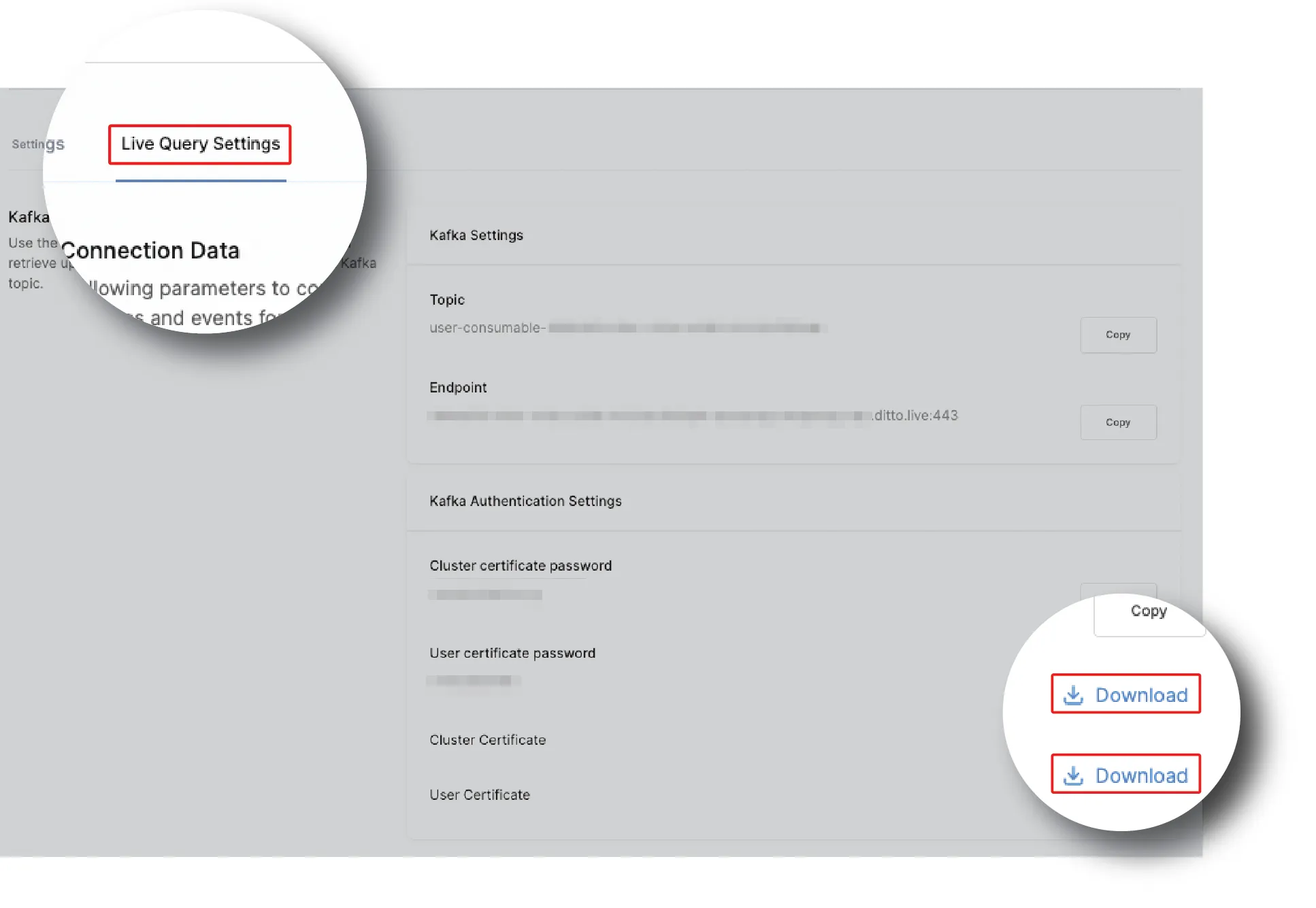
To get your certificates, from the Ditto portal > Live Query Settings, click Download next to Cluster Certificate and User Certificate:
Prevent unauthorized access and potential security breaches by storing your downloaded certificates in a secure location.
Setting Up
Using the following mappings between authentication tokens and their respective Kafka configuration for SSL connections, integrate :
SSL Connection | Ditto Name | Description |
|---|---|---|
ssl.truststore.location | Cluster certificate | The certificate authority (CA) certificate in PKCS12 format. |
ssl.truststore.password | Cluster certificate password | Decrypts the value of the CA certificate. |
ssl.keystore.location | User certificate | Signifies the location of the user certificate in PKCS12 format. |
ssl.keystore.password | User certificate password | Decrypts the user certificate. |
Verifying Integration
Once you've set up and configured your Kafka topic with Ditto, perform a simple test to validate successful integration:
Copy-paste the following bash script in a terminal, and then replace each variable with the relevant information that displays in the Ditto portal > Live Query Settings for your app:
Make sure that the values you enter in your configuration for the Kafka Group and Kafka Topic settings match the string that displays in the Ditto portal > Live Query Settings for your app.
This alignment is critical for proper integration between Ditto and Kafka.
If the test is successful, no errors display in your terminal, and the script continues running without shutting down.
CLUSTER_CERT_LOCATION=/path/to/cluster.p12
CLUSTER_CERT_PW=<YOUR_CLUSTER_CERT_PASSWORD>

USER_CERT_LOCATION=/path/to/user.p12
USER_CERT_PW=<YOUR_USER_CERT_PASSWORD>

CLOUD_ENDPOINT=<YOUR_ENDPOINT>
TOPIC=<YOUR_TOPIC>

KAFKA=/path/to/kafka_2.13-3.1.0

$KAFKA/bin/kafka-console-consumer.sh \
 --bootstrap-server $CLOUD_ENDPOINT \
 --consumer-property security.protocol=SSL \
 --consumer-property ssl.truststore.password=$CLUSTER_CERT_PW \
 --consumer-property ssl.truststore.location=$CLUSTER_CERT_LOCATION \
 --consumer-property ssl.keystore.password=$USER_CERT_PW \
 --consumer-property ssl.keystore.location=$USER_CERT_LOCATION \
 --group $TOPIC \
--topic $TOPIC Keeping the script active in your terminal, verify that events write to the console every time a change replicates to the Big Peer by performing a write operation in the codebase of your app:
The following snippets demonstrate upserting a new value to the Ditto store in various languages:
const docID = await ditto.store.collection('people').upsert({
  name: 'Susan',
  age: 31,
})
console.log(docID) // "507f191e810c19729de860ea"
curl -X POST 'https://<CLOUD_ENDPOINT>/api/v4/store/write' \
--header 'Content-Type: application/json' \
--data-raw '{
"commands": [{
"method": "upsert",
"collection": "people",
"id": "abc123",
"value": {
"name": "Susan", "age": 31
}
}]
}'If you want to react to a consumable event by writing changes to the Ditto store, use the HTTP API. For more information, see Ditto Events, as follows, and the HTTP API Reference [test].
Events Message Streams
Once your consumer is active, events appear as a JSON message stream in your Kafka console whenever a change successfully replicates to the Big Peer.
If you want to respond to a consumable event by triggering changes in the Ditto store, invoke the Ditto HTTP API. For more information, see HTTP API Reference [test].
Standard Fields
The structure of the message stream includes both standard fields and fields that are specific to each event.
The following table provides an overview of the standard set of fields that are included in every message.
For an overview of event-specific fields, see New Documents Events, Updated Document Events, and Removed Document Events, as follows.
Field | Description |
|---|---|
txnID | The timestamp for when the Big Peer internally replicates data modifications from small peers. (This timestamp is an always‑increasing value.) |
type | The type of event stream. |
collection | The collection that the changed document belongs to. |
change.method | The method that executed the event. |
New Document Events
Once an upsert execution completes and a new document is created, a JSON event stream similar to the following displays in your Kafka console:
{
  "txnId": 552789,
  "type": "documentChanged",
  "collection": "people",
  "change": {
    "method": "upsert",
    "oldValue": null,
    "newValue": {
      "_id": "6213e9c90012e4af0017cb9f",
      "date": 1645472201,
      "name": "Susan",
      "age": 31
    }
  }
}
The following table provides an overview of the event-specific fields for the upsert event.
Field | Description |
|---|---|
change.oldValue | The previous state of the document; since the document did not previously exist, the change.oldValue field is always set to null. |
change.newValue | Self-describes the data encoded in the document at upsert. |
Updated Document Events
Once an update operation completes, a JSON event stream indicating the change displays in your Kafka console.
For example, if an update operation specified the following changes.
{
  ownedCars: 0,
  friends: [],
  name: "Frank"
}
You would receive the following JSON event stream:
{
  "txnId": 553358,
  "type": "documentChanged",
  "collection": "people",
  "change": {
    "method": "update",
    "oldValue": {
      "_id": "6213e9c90012e4af0017cb9f",
      "date": 1645472312,
      "name": "Susan",
      "age": 31
    },
    "newValue": {
      "_id": "6213e9c90012e4af0017cb9f",
      "date": 1645472312,
      "name": "Frank",
      "ownedCars": 0,
      "friends": []
    }
  }
}
The following table provides an overview of the event-specific fields that provide information specific to the update event.
Field | Description |
|---|---|
change.oldValue | The previous state of the document. |
change.newValue | Provides both the fields that changed and the fields that remain unchanged. |
Removed Document Events
Once a remove operation completes, a JSON event stream similar to the following displays in your Kafka console:
{
  "txnId": 701251,
  "type": "documentChanged",
  "collection": "people",
  "change": {
    "method": "remove",
    "value": {
      "_id": "6213e9c90012e4af0017cb9f",
      "date": 1645468039,
      "name": "Susan",
      "age": 31
    }
  }
}
Field | Description |
|---|---|
change.value | Indicates the full document at the time of its removal. |
Event Failures
When the producer fails to keep up with the incoming changes, a requeryRequired event type displays in your Kafka console. (See Responding to Streaming Failures)
Following is an example of a requeryRequired event stream:
{
  "txnID": 45,
  "type": "requeryRequired",
  "documents": []
}
The documents field is now deprecated and will only return an empty list, as demonstrated in the previous snippet.
Responding to Streaming Failures
To maintain data integrity, if you receive a requeryRequired message, invoke the HTTP API to update your system for the entire dataset.
To update your system for the full dataset, use the event'stxnID as a value of X-DITTO-TXN-ID in the HTTP API call.
To avoid the risk of missing updates, you must requery the complete dataset.
After you've requeried the full dataset, directly following the requery-required message, resume applying changes from the CDC stream.