HTTP API - Getting Started
Ditto offers an HTTP API to programmatically interact with transactional data generated in the mesh network and stored within the Big Peer. The Big Peer is an optional feature for managing and coordinating data in the peer-to-peer mesh network. For more information, see Cloud Platform Overview.
The HTTP data API is designed following the principles of the remote procedure call (RPC) framework. So, despite the actual exchange occurring over a network, you make requests from Ditto's API methods as if making local calls.
This article provides an overview of the HTTP data API:
About RPC Framework
The RPC framework is of the request-response category, where a client sends one message to the Big Peer and receives one response in return.
The HTTP API is structured around various resources, which are endpoints you call in your code to perform specific actions, such as update, and receive corresponding responses from the Big Peer.
These resources correspond to the key elements of the Ditto document model. For more information, see Document Model.
Cloud URL Endpoint
Use the Ditto HTTP API to integrate external systems with Ditto-backed apps hosted on cloud.ditto.live and programmatically interact with them using an HTTP server interface.
The following URL is the base location from which you can make your HTTP API requests:
curl https://{app_id}.cloud.ditto.live/api/v4Getting Your Canonical Root URL
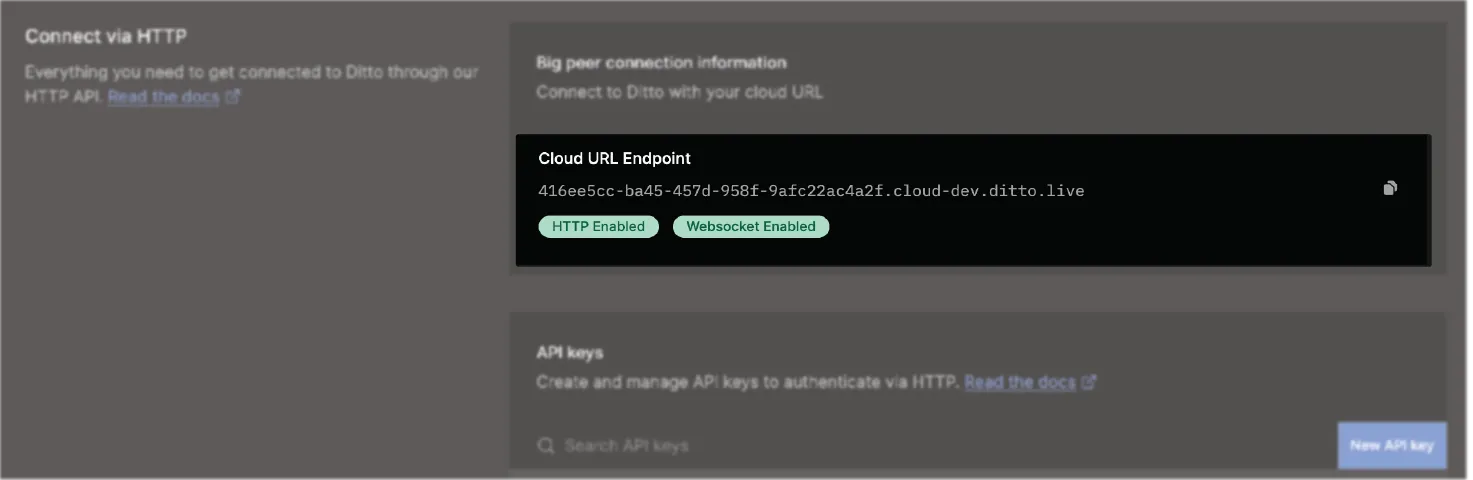
For your canonical root URL, go to the Ditto portal > select your app > and then, from the Connecting via HTTP group at the bottom of the page, copy your Cloud URL Endpoint:
Swagger Endpoint
To access the HTTP API reference, use the following URL endpoint to view the OpenAPI swagger.json specification. For more information, see the official Swagger documentation > OpenAPI Specification.
When accessing the swagger.json specification, make sure to replace the {app_id} parameter with the unique app ID provided when you created your app in the portal:
Data Representations
Ditto uses UTF-8 to encode data. For more information, see Encoding Standard: UTF-8.
Unless otherwise specified, the default representation format for individual resources is JSON, as indicated by the Content‑Type HTTP header included in your response:
Content-Type: application/jsonEncoding Standard: UTF-8
Unless you have a specific requirement for a different encoding, encode your input data in UTF-8. UTF-8 is a variable-length schema for universal character encoding. For more information, see the official "UTF-8" Wikipedia article.
Make sure to encode your text-based data, such as JSON, using the UTF-8 encoding.
If using another format to encode, such as UTF-16, decoding errors and invalid results are likely to occur.
Encoding Formats: Binary Data
To transmit binary data, such as a media file, to the Big Peer, you must first convert it into either of the following formats:
- For smaller data, use a Base64-encoded string.
The following table provides an overview of the acceptable encoding formats by binary size:
Binary Size | Encoding Format |
|---|---|
Below 250 KB | Base64-encoded string value |
Between 250KB and 2MB | ATTACHMENT object |
2MB and above | This will be rejected as the payload is too large. Please get in contact with Ditto Support to have this limit increased for your deployment if necessary. |
Once converted, include your Base64-encoded string in your request.
Failing to send binary data encoded with either Base64 or an ATTACHMENT, as appropriate, may result in compatibility issues leading to data corruption or loss.