ATTACHMENT
This article provides conceptual information for the ATTACHMENT data type. For instructions, see CRUD Operations > CREATE, READ, UPDATE, and DELETE.
Use Case
The ATTACHMENT data type lets you link extensive amounts of binary data — such as images, videos, deeply embedded documents of 50 megapixels or more — as well as any other type of file that changes rarely to a document. This linking allows for on-demand sync, both online or offline, without any conflicts.
You can create and transmit attachments across peers, even with intermittent connectivity; however, unlike documents, which are always accessible and automatically sync when relevant per sync subscriptions, peers do not automatically fetch the attachment data associated with a subscription — so attachments must first be explicitly fetched before you can access them.
For a realworld usage scenario, see either the demo chat app for iOS or Android in the getditto > demoapp-chat GitHub repository.
Structure Overview
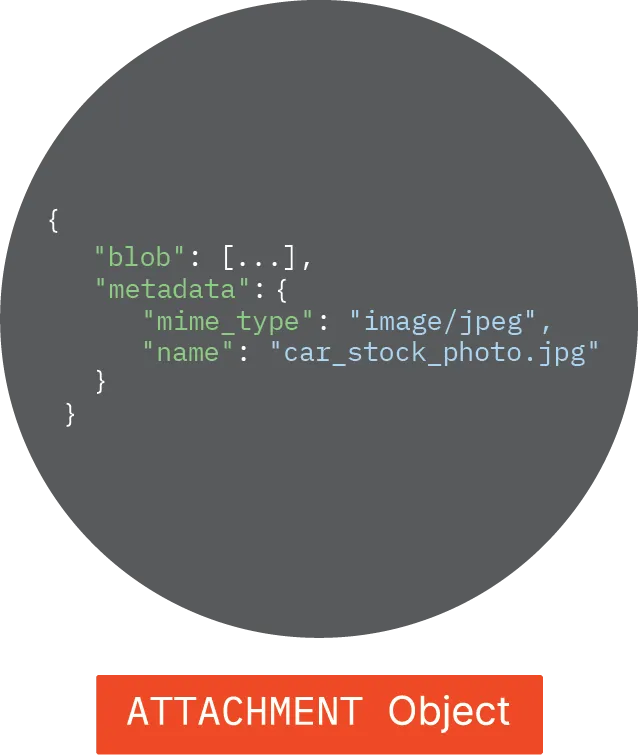
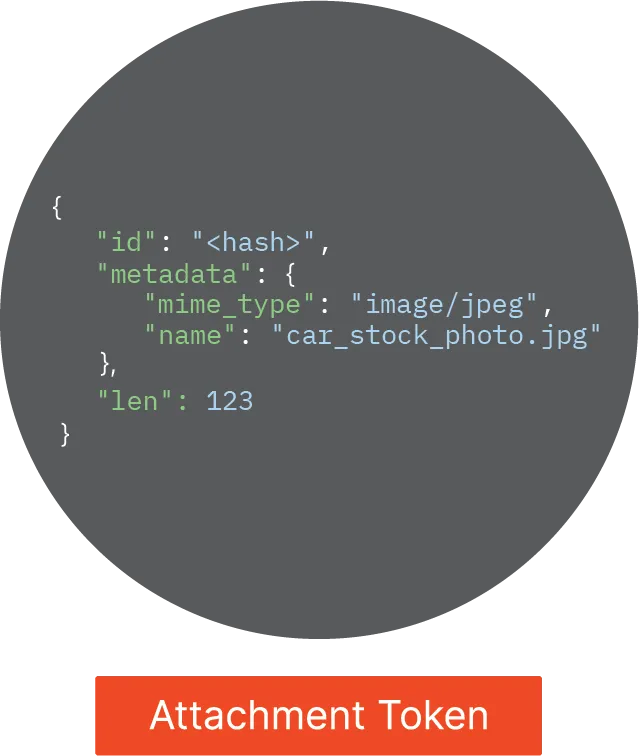
When incorporating an attachment into a document, rather than inserting the entire resource-heavy ATTACHMENT object into the document, internally Ditto inserts a pointer object, known as the attachment token. (See ATTACHMENT Object and Attachment Token)
ATTACHMENT Object
The ATTACHMENT object, shown on the right, stores your attachment outside of the local device, is not directly visible in your code, and consists of metadata and a binary large object (blob) store.
- The metadata component is a set of string values providing extra details about the file or complex document, such as name and size, among other identifying information.
- The blob store is an array of bytes representing your large file or complex document encoded as an ATTACHMENT data type. (See Blob Store)
Attachment Token
The attachment token, shown on the right, encapsulates information Ditto uses to identify and retrieve the full attachment when needed; as in you've explicitly fetched it in your app.
Schema
The following structure and corresponding table provide an overview of the schema the attachment token uses to model the data it contains:
{
  "id": "string",
  "len": 42,
  "metadata": {}
}
Here are the attachment token properties you can query to increase the efficiency of fetching operations in your app:
Field | Detail | Description |
|---|---|---|
id | Attachment ID | A cryptographic hash of the attachment's binary contents. (See Organizing by ID) |
len | Blob Length | The size of the blob data in terms of length (len) in bytes. (See Blob Store) |
metadata | Metadata | Additional information about the attachment, such as its name, type, and so on. |
Blob Store
A JSON blob stores binary data representing any file type. For example, it can store image files like JPEG, PNG, and TIFF; video files such as MP4; audio files, including MP3 and WAV; document files like PDF; and more.
The metadata is stored in the document, while the blob is stored in a dedicated location independent of documents. The following table provides an overview of blob storage locations:
Type | Blob Store Location |
|---|---|
Small Peer |
|
Big Peer | Cloud object storage service: Amazon WebServices (AWS) Simple Storage Service (S3). |
Organizing by ID
Ditto organizes and stores blob data using the content-addressable network (CAN) paradigm. CAN is a distributed network architecture widely implemented in decentralized systems like Ditto's where scalability, efficiency, and fault tolerance are essential requirements. (See the official Content-Addressable Network Wikipedia article.)
In more straightforward terms, Ditto organizes and accesses attachment data by the cryptographic hash table of its contents — for instance, attachment ID — rather than its physical location. A hash table is a data structure that stores key-value pairs.
By adhering to the CAN framework for attachment management, Ditto stores and retrieves data efficiently. For instance:
- Deduplication — If the same blob is created multiple times, Ditto stores only one copy. Similarly, if an attachment is added to multiple documents, they all reference the same blob.
- Conflict-free sync — Blobs are stored based on the cryptographic hash of their contents, ensuring that conflicts are effectively impossible.
- Decentralized — No central server is required to manage attachments. They can be created and accessed concurrently throughout the network, even with intermittent connectivity.
Purging Blob Data
Blob storage is managed internally using a reference-counting process known as garbage collection.
The garbage collection process running periodically in the background of Small Peers frees up space by removing blobs that no longer have any references — once an attachment has no remaining references, its blob is considered safe to remove, and the garbage collection process clears it from the device.
Syncing ATTACHMENT Objects
The two components comprising an ATTACHMENT object — metadata stored internally within a document and blob data storing the actual binary data of your attachment — sync in different ways:
- Metadata syncs just as any other document.
- Blob data syncs with an entirely different protocol than documents; one that is asynchronous and built on top of Ditto's rainbow connection technology and optimizes for large binary data transfer. (See Mesh Networking 101)
Attachment blob sync being asynchronous provides three key advantages:
- Unblocking fetching operations so document continue syncing without interruption when retrieving an attachment.
- Ditto multiplexes between these independent activities to balance needs for low latency and high throughput at the edge.
- Blob sync is resilient, so if connectivity is interrupted while transferring an attachment, progress is not lost. Once restored or if another peer possesses the attachment, Ditto resumes the transfer from the point of interruption.
Blob sync remains performant — Ditto uses data structures like Bloom filters to scale efficiently and remain light on system resources.
Bloom filters are randomized data structures designed to represent sets in a compressed form, making them highly effective in peer-to-peer environments where concerns such as memory usage and accuracy are prevalent. (See the official Bloom filter Wikipedia article.)
Garbage Collection
When an attachment token stored on a Small Peer end-user device is unused, meaning there are no remaining references to it, a background process that runs periodically, every 10 minutes, automatically deletes it to free up space.
This reference-counting process, known as garbage collection, only runs on Small Peer devices (not on the Big Peer). It involves scanning for objects, including blobs, that are no longer needed or relevant and are therefore safe to delete from its device.
The Big Peer stores its data in Ditto's third-party cloud object storage service provider, Amazon WebServices (AWS) Simple Storage Service (S3). For more information, see the official Amazon Simple Storage Service Documentation.
Lazy-Load Retrieval Pattern
Since the blob is stored outside the local Ditto store, fetch it only when needed. Referred to as lazy loading, this "on-demand" retrieval pattern reduces resource usage on end-user devices.
Merge Strategy: Last-Write-Wins
Creating and Working with Attachments
There are two separate steps in the process of creating an attachment:
Generate the attachment in the Ditto store. (See Initiating ATTACHMENT Objects)
Reference the attachment token in a document. (See Referencing Attachment Tokens)
To access your attachment data on demand or perform other operations, such as updating or deleting the attachment, first fetch its associated attachment token. (See Fetching Attachment Tokens)