Data Handling Essentials
This article provides a complete overview of the various data types you can use with your queries to retrieve, modify, and sync data in Ditto. In addition, you'll find an introduction to related concepts like conflict resolution strategies.
Introduction
In Ditto, there's a clear distinction between traditional create, read, update, and delete (CRUD) database operations and data sync.
CRUD
For CRUD operations, you interact with data stored locally in the Ditto store by invoking a single operation on the store namespace. Once executed, Ditto returns a response object encapsulating the results.
The following table provides a high-level overview of the different ways you can perform CRUD in Ditto:
Operation | Description |
|---|---|
CREATE | Using the INSERT statement, either insert a new document or update an existing document for a given document ID. |
READ | Using the SELECT statement, retrieve documents based on the specific criteria you pass as parameters in your function. |
UPDATE | Using the UPDATE method, write changes to Ditto. |
DELETE | Using the EVICT method, remove local data from your store. In addition, using a soft-delete pattern, indicate data as deleted without physically removing it from Ditto. |
Sync
For syncing, you set up remote listeners, or sync subscriptions, to monitor changes to the data you're interested in. When data changes, Ditto automatically syncs the delta changes to your local Ditto store.
Observe
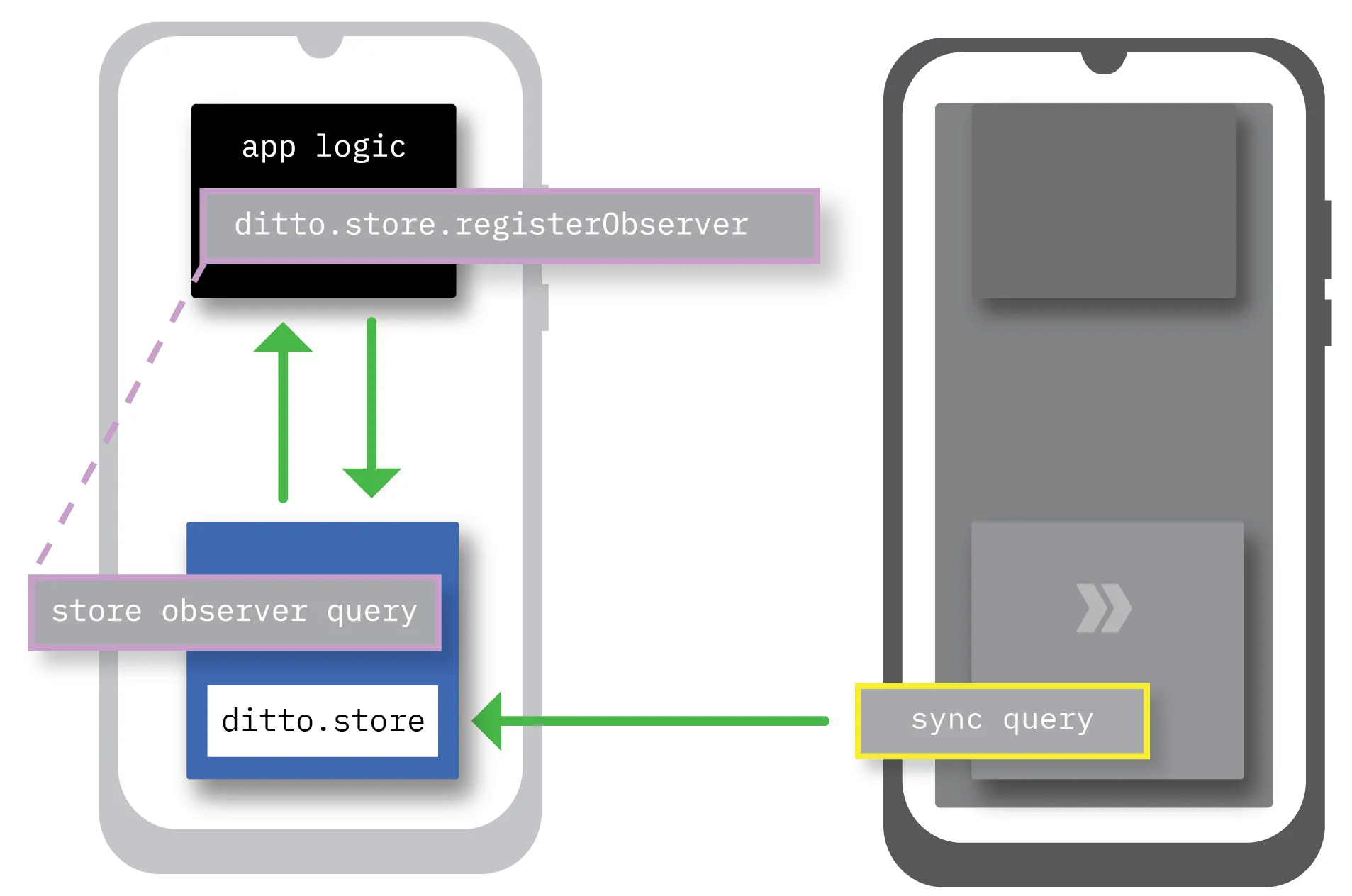
In addition to setting up sync subscriptions to monitor mesh-wide data changes, you can establish local listeners known as store observers to monitor changes in the Ditto store operating locally.
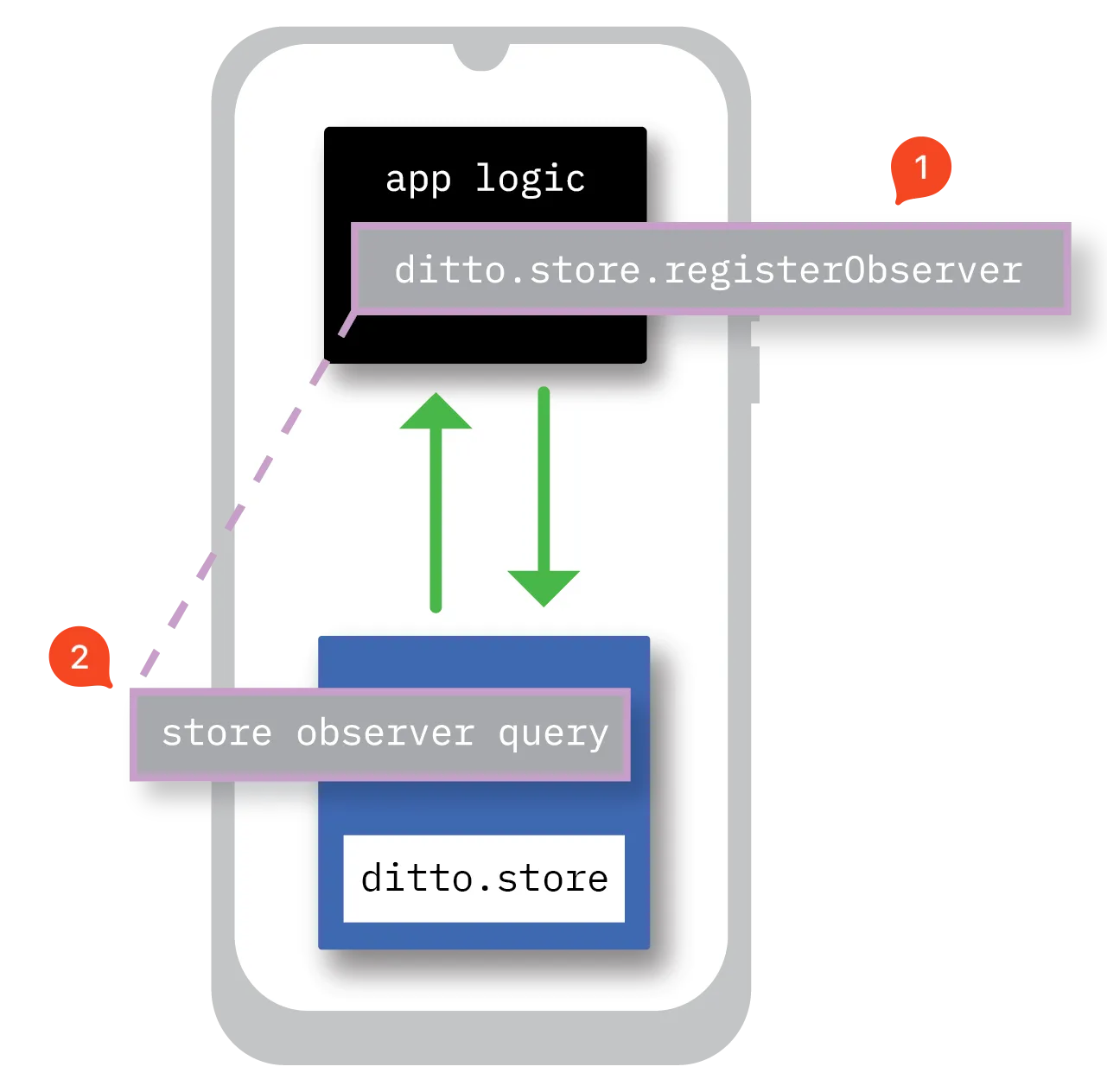
A store observer is a DQL query that runs continuously and, once Ditto detects relevant changes, asynchronously triggers the callback function you defined when you set up your store observer. For instance, when the end user updates their profile, display the profile changes to the end user in realtime.
Documents and Collections
Ditto stores data in structured JSON-like document objects. Each document consists of human‑readable fields that identify and represent the information the document stores.
The following snippet provides an example of a basic JSON-encoded document object:
{
  "_id": "abc123",
  "make": "Hyundai",
  "year": 2018,
  "color": "black"
}
A single document consists of one or more fields that self‑describe the data it encodes; each field is associated with a value:
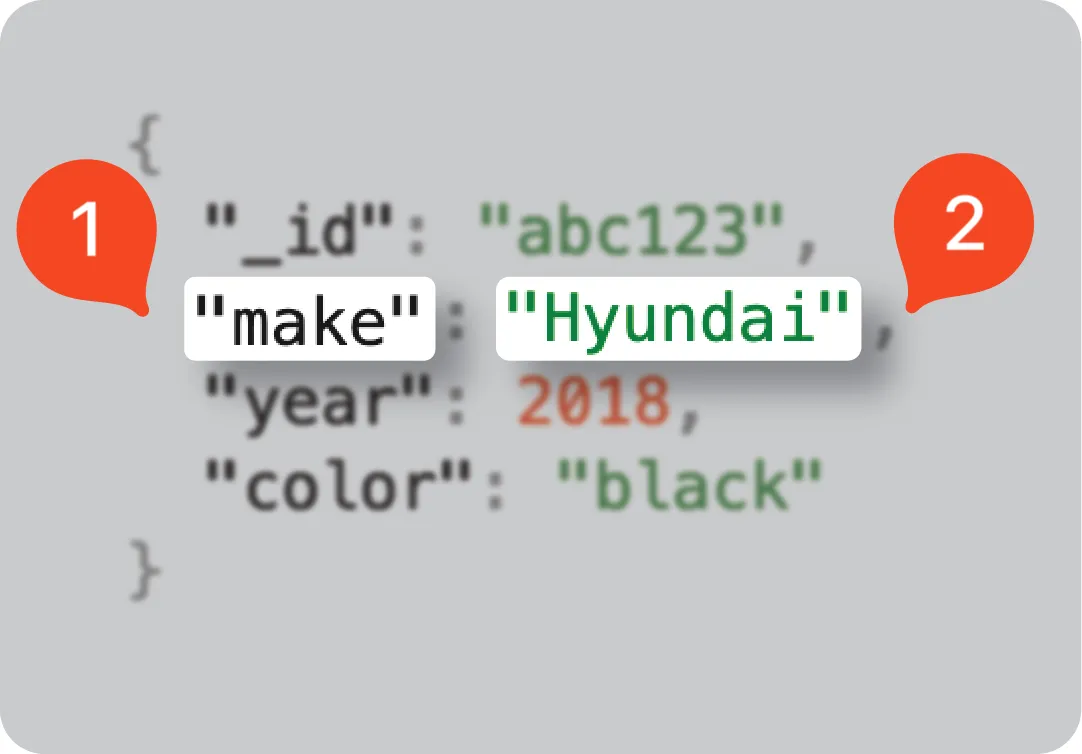
Item | Description |
|---|---|
1 | The name identifying the data. |
2 | The value that holds the actual data to store. |
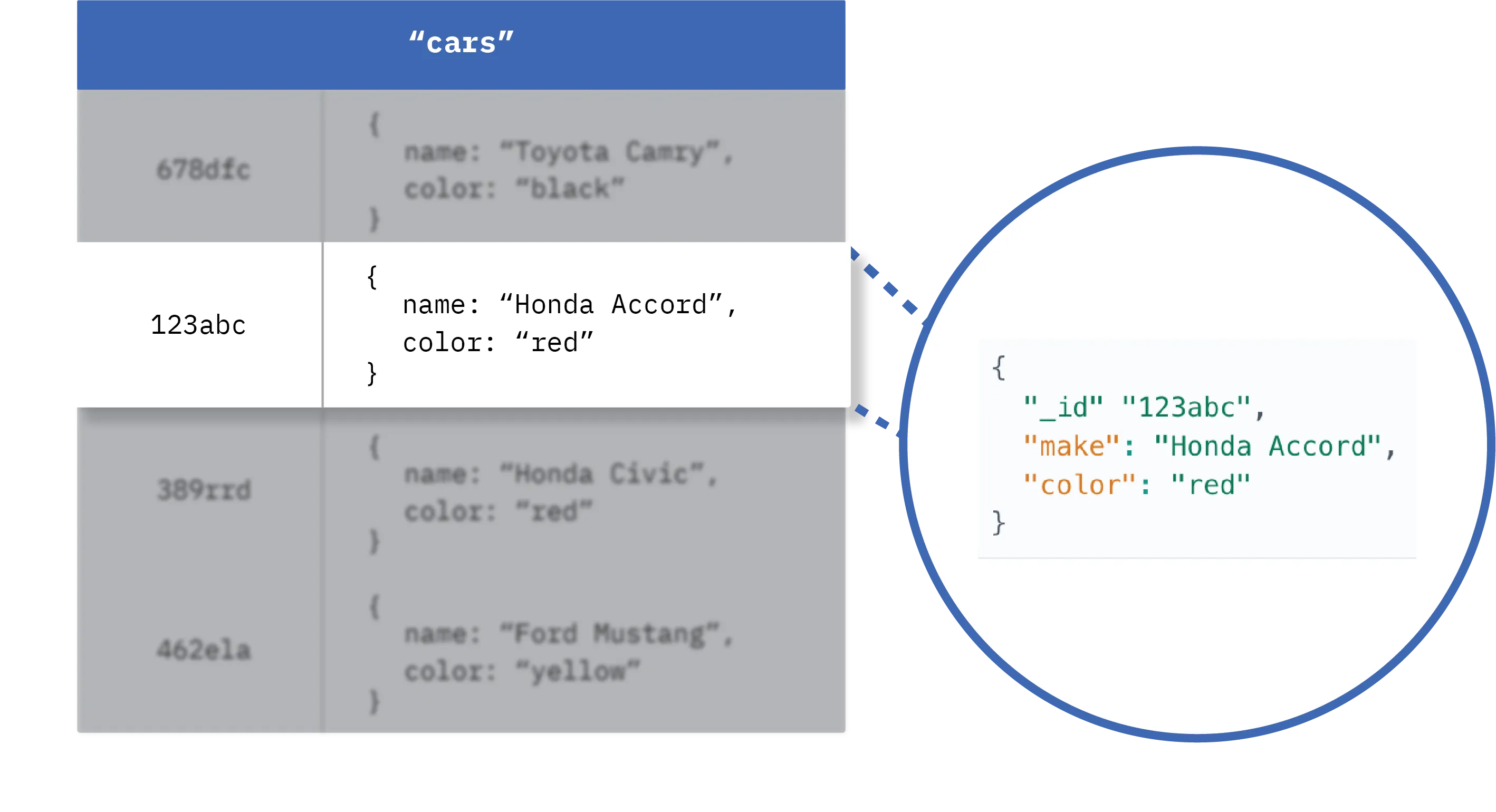
A grouping of related documents is referred to as a collection. Think of a collection as a table in a relational database table — but with greater flexibility in terms of the data it can hold — and the documents in a collection like table rows:
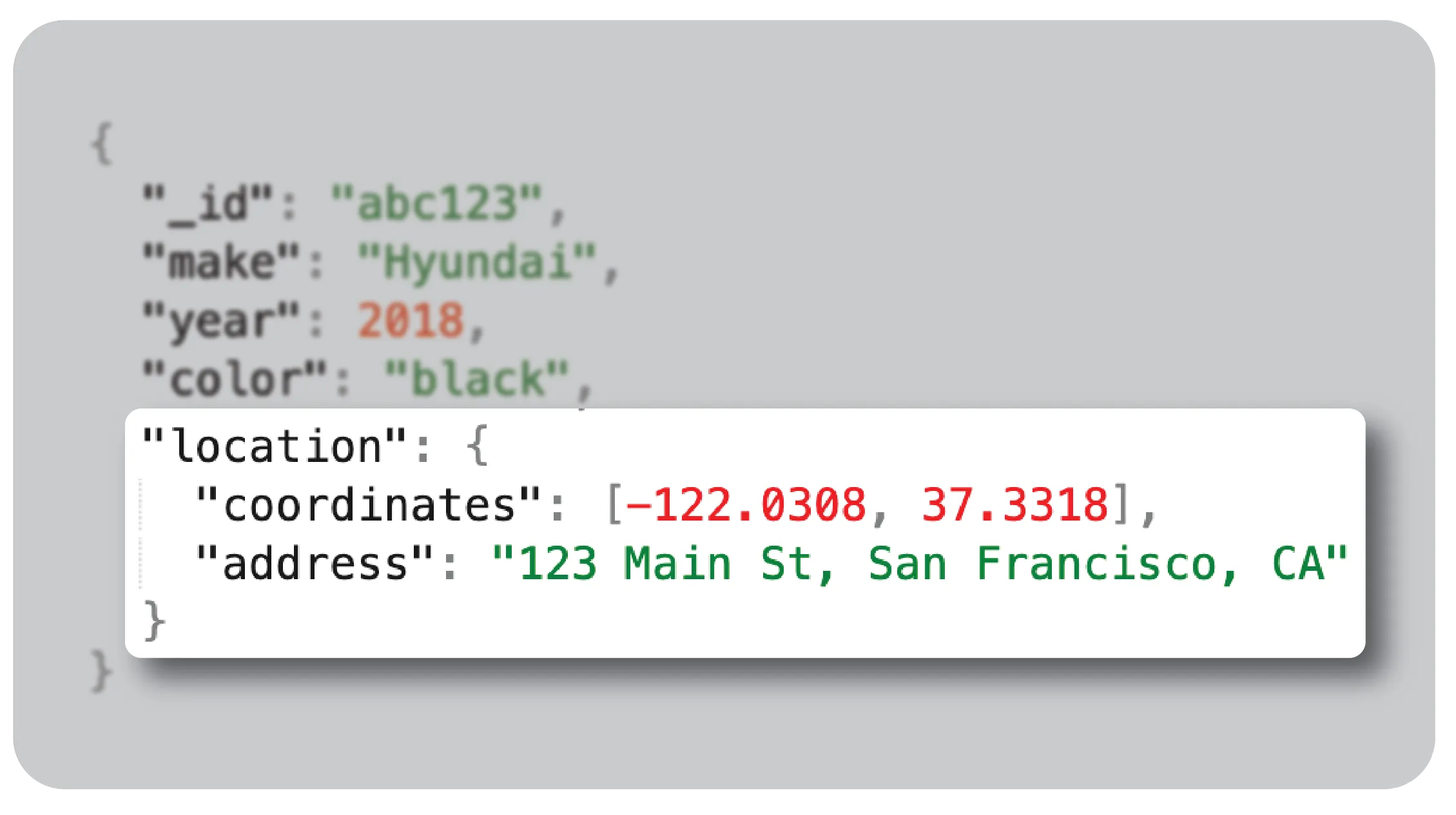
In the following structure, the location field property is logically grouped with details about the car, such as its make, year, and color.
It contains nested fields. also referred to as subfields, representing both the coordinates and the address where the car is located:
Dedicated Query Language
Ditto Query Language (DQL) is the platform's dedicated query language for defining criteria for local database operations and data sync with remote peers. For instance, you use DQL to perform various filter operations like traditional CREATE, READ, UPDATE, and DELETE (CRUD) and filter data for sync subscriptions.
DQL is a familiar SQL‑like syntax designed specifically for Ditto's edge-sync features that enable the platform's offline-first capabilities. DQL offers features like:
- Reusable statements
- Clear syntax
- Advanced querying capabilities
Query Statements Overview
The following table provides an overview of the types of statements you'll write in DQL and enclose within your API method operations to specify data selection criteria:
Namespace and Method | Statement | Action |
|---|---|---|
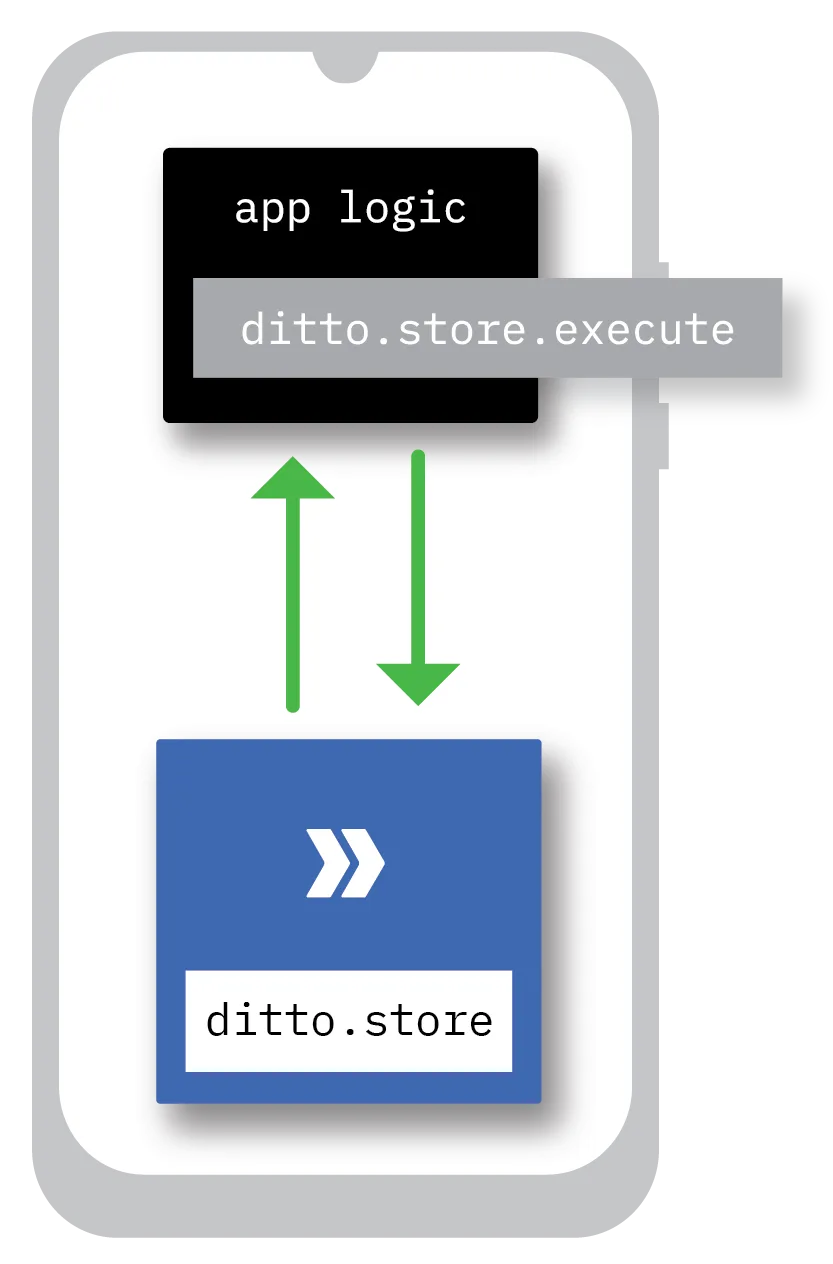
ditto.store.execute | Local | Interact with data stored locally within the Small Peer device running your app. |
ditto.store.registerObserver | Observer | Set up store observers to monitor changes to data in the local Ditto store based on specified query criteria. |
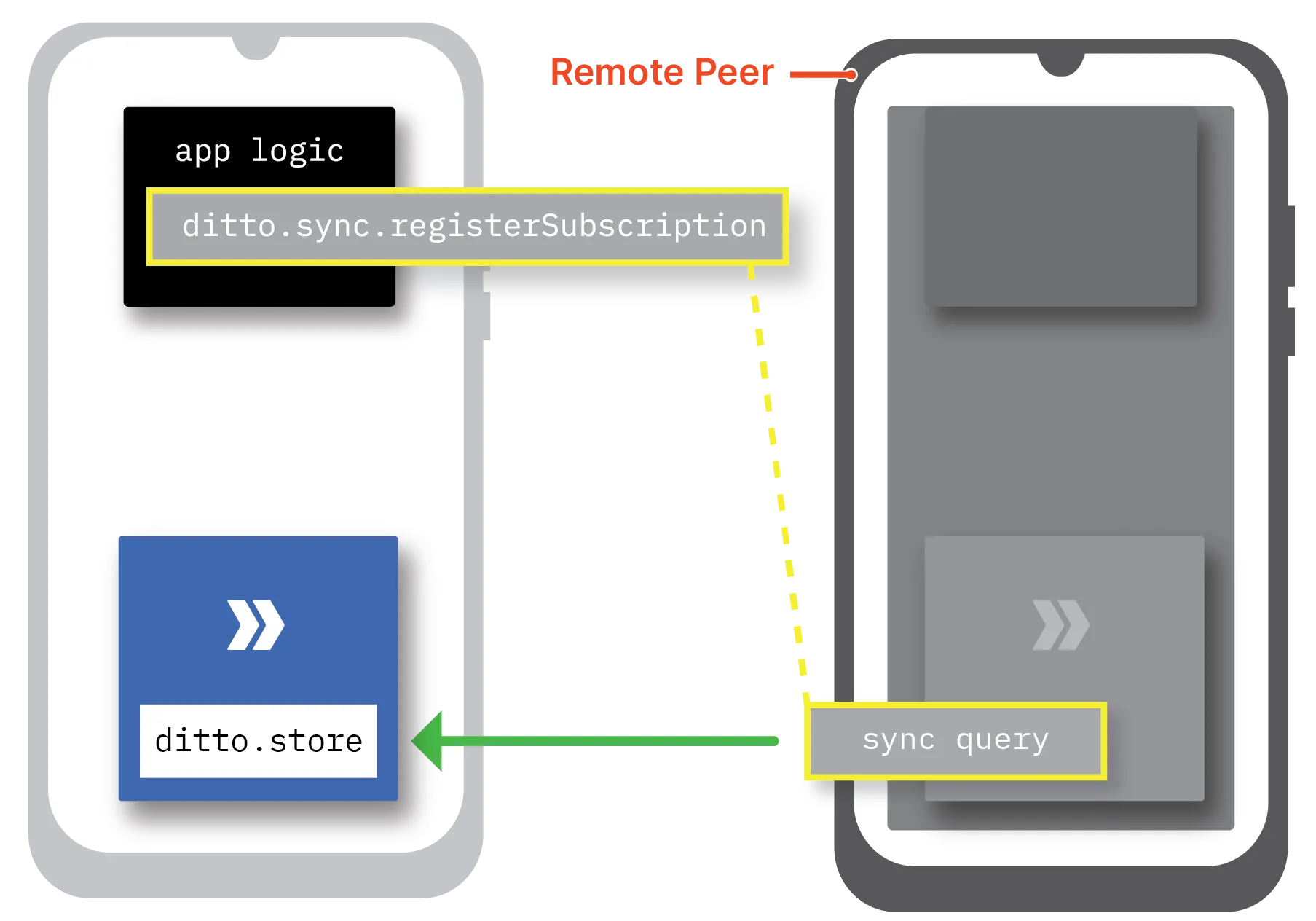
ditto.sync.registerSubscription | Sync | Set up subscriptions for syncing data from other peers based on their associated queries. |
Data Types and Scalar Types
When writing queries with DQL, data formatting is categorized into two categories:
Scalar type
A scalar data type is a string, boolean, array, and any other basic primitive type.
In addition, a scalar type is a JSON blob object capable of nesting multiple key-value pairs functioning as a single value.
Data type
An advanced type that guarantees conflict-free resolution at merge and includes REGISTER, MAP, and ATTACHMENT.
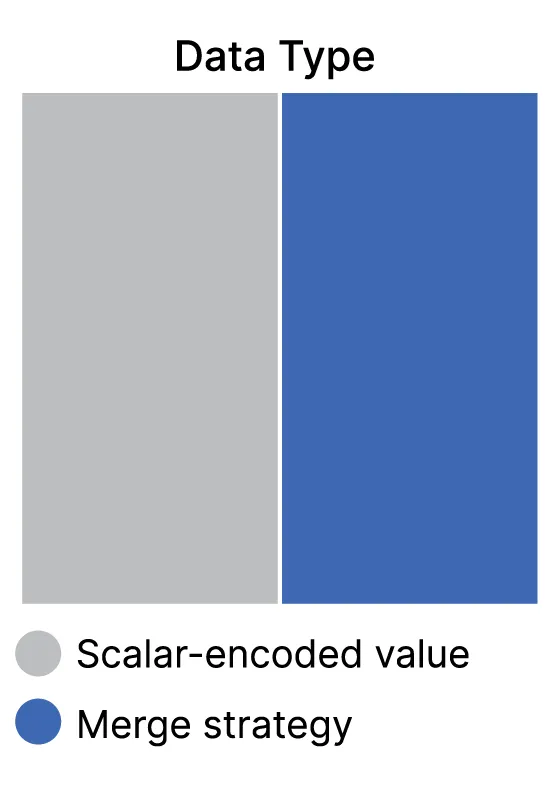
As illustrated on the right, each data type includes two components:
- The value to be stored — encoded using scalar types like string, boolean, and so on.
- The field‑specific metadata that defines the enforced merge strategy in conflict resolution.
The default data type is REGISTER ; you'll use other data types in specific scenarios where appropriate.
Specifying Data Types
To use a DQL type other than a REGISTER — the default data type in Ditto — you must explicitly specify the type in your query; otherwise, Ditto defaults to the REGISTER type as follows.
SELECT * FROM COLLECTION cars
WHERE features.trim = 'Standard'
Here is an example illustrating the same SELECT statement query explicitly expressed as a MAP structure. It specifies retrieval of the MAP structure storing the"features" collection with a "trim" field property set to a value of "standard":
SELECT * FROM COLLECTION cars (features MAP)
WHERE features.trim = 'Standard'
Conflict Resolution
As the foundation of how Ditto exposes and models data, these data types leverage conflict-free replicated data type (CRDT) technology to ensure that no data inconsistencies occur as a result of concurrent modifications; that is, simultaneous edits made to the same data types in multiples local Ditto stores.
All data types —REGISTER, MAP, and ATTACHMENT— adhere to the causal consistency model when resolving concurrency conflicts.
The causal consistency model is a guarantee that if there is an operation that must happen before another operation — for example, events A and B, where B is a result of A — all peers agree upon and observe the same sequential order of these operations; as in, A always executes before B.
Merge Strategies
In Ditto's implementation, conflicts are automatically resolved, merged, and synced across peers without the need for coordination or validation from a centralized authority.
Within this consistency model, there are two principles for guiding conflict resolution at merge:
- Last-write-wins merge strategy
- Add-wins merge strategy
The following table provides a quick overview of the data types you can use to write queries, along with their merge strategies, a brief description, and a common usage scenario:
Type | Merge Strategy | Description | Use Case |
|---|---|---|---|
REGISTER | "Last write wins" | Stores a single value and allows for concurrent updates. | Store JSON‑compatible scalar subtypes, including a nested blob representing two or more fields as a single object. |
MAP | "Add wins" | Contains a nested object consisting of any Ditto type: REGISTER, MAP, and ATTACHMENT. | Enable field-level concurrent hierarchy within a Ditto document. |
ATTACHMENT | "Last write wins" | Stores the token you use to retrieve the ATTACHMENT. | Reduce Small Peer resource usage by storing data that can be retrieved lazily; as in, you fetch the data only when needed. |
Representing Complex Datasets
When you want to embed a hierarchical structure to represent complex parent‑children data structures within a document in DQL, you have the option to nest either of the following:
- JSON blob functioning as a REGISTER
- MAP
The decision between the two depends on your specific use case.
For instance, to represent embedded values with dependencies, such as a GPS coordinate along with its corresponding address, structure your data in a JSON object, as follows:
"location": {
  "coordinates": [-122.0308, 37.3318],
  "address": "123 Main St, San Francisco, CA 94105"
}
This is because, unlike a MAP, a JSON object functions as a single unit. Managing both the coordinate and address as a cohesive unit ensures that any changes made to one automatically update the other.
Similar to the JSON object, the array type in Ditto acts as a REGISTER and therefore encapsulating values function as a single unit.
Representing coordinates as an array, as demonstrated in the previous snippet, is the smart choice since its latitude and longitude values function as a unified entity, always changing simultaneously.
To represent embedded values with no dependencies; that is, you want the flexibility to update each key-value pair independently, and structure your data as separate REGISTER fields in a MAP:
"features": {
  "trim": "Standard"
  "speakers" : 5
}
To represent highly complex data structures in which you need to establish additional hierarchies, embed a MAP within another MAP, as follows:
Syncing large documents can significantly impact network performance.
The decision to use deeply embedded MAPS in a single document or opt for a flat model depends on requirements, relationships between data, and tolerance for certain tradeoffs.
"owner": {
      "name": "John Larson",
      "information": {
          "address": "2147 Chestnut St, Oakland, CA 94607",
          "phone": "555-555-5555",
          "updated": "June 2, 2023"
         }
     }
Distinctions by Type
The following graphic and corresponding table aim to demonstrate the distinct capabilities and versatility of each DQL type.
The REGISTER data type functions as the default in Ditto for scalar-encoded values. So any scalar-encoded values, including embedded JSON objects and arrays, are assumed to be type REGISTER.
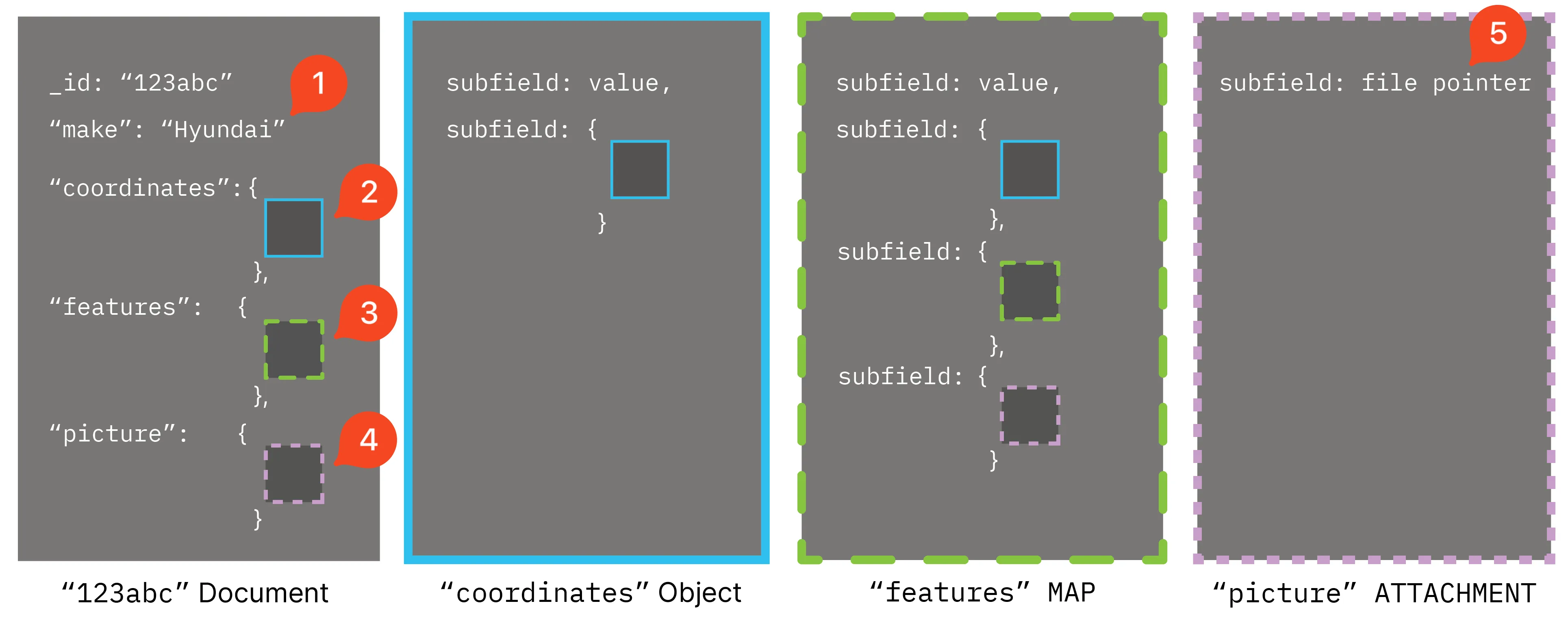
Item | Type | Description |
|---|---|---|
1 | REGISTER | A value can be any JSON-encoded primitive type: boolean, numeric, binary, string, array, andNULL. |
2 | REGISTER | A hierarchical data structure of multiple JSON-encoded fields nested within a larger JSON object and serves as a single value. |
3 | MAP | A hierarchical data structure of two or more key-value pairs encoded using any data type — REGISTER, ATTACHMENT, or MAP. |
4 | Response Object | The response object returned after creating a new ATTACHMENT. You use the ATTACHMENT response object within your app's code to retrieve and display the file to the end user, as appropriate, and to update or delete the file. |
5 | Attachment Token | The pointer that Ditto uses to reference the large file's storage location when fetching. You can use an ATTACHMENT for any file type, including binary data of 50 megapixels or more, such as an mp4 file, or a large document object featuring complex hierarchical structures. |
MAP Data Type Conflicts
An issue unique to MAP data types is the possibility for two offline peers to create a new document, in which one peer represents the field as an object (MAP), while the other peer represents the field as an array.
Divergent Types Preventing Merge
The following snippets illustrate a scenario of a type-level conflict unique to MAP types. Peer A creates the following new document:
{
  "name":"Bob Jones",
  "address": {
    "street":"Long Road",
    "house number":10298,
    "zip":"90210"
  }
}
While at the same time Peer B creates the following new document:
{
  "name": "Bob Jones",
  "address":[
    10298,
    "Long Road",
    "90210"
  ]
}
Managing Conflicts: Update History
Store Operations
There are two ways of interacting with the Ditto store operating locally on end-user devices:
- Perform a one-time execution of a create, read, update, delete (CRUD) operation against the store namespace.
- Asynchronously monitor changes by setting up observers against the store namespace for continuous monitoring of changes.
Sync Operations
Establish sync subscriptions to monitor changes to the data you're interested in. The queries defining your data criteria run on all remote stores that are part of the subscription.
When you subscribe to a collection or a specific set of documents, the subscription query is distributed to all relevant stores in the network. Each store executes the query locally and sends updates to the subscriber whenever changes match the subscription criteria.
Patterns
This topic provides an overview of lazy-load retrieval, memory management, ping-pong effect, and utilizing a MAP to sync concurrent changes.
Understanding these patterns will help you make informed design decisions in your app.
Lazy-Load Retrieval
To improve performance, instead of storing a file that encodes large amounts of binary data within a document, consider storing a reference to it in a separate, explicitly fetched object (token) known as an ATTACHMENT.
With the ATTACHMENT data type, you can implement lazy loading. Lazy loading is when you delay retrieval until necessary rather than aggressively fetching the data in anticipation of hypothetical future use. This "on-demand" retrieval pattern enhances performance by optimizing resource usage.
Memory Management
Data storage management is essential for preventing unnecessary resource usage, which affects sync performance, battery life, and overall end-user experience.
Eviction is important for use cases like cabin crew apps where data from the last flight is not needed on the next flight.
Ping-Pong Effect
Using a MAP for Concurrent Updates
Imagine a scenario in which two Ditto stores, peer A and peer B, have the following document:
{
  "_id": "abc123",
  "color": "red",
  "make": "Toyota",
  "mileage": 160000,
  "inspections": "<very large map>"
}
Peer A calls the Upsert method to change the field-value color:red to color:blue:
val initialDocument = mapOf(
  "_id" to "abc123",
  "color" to "blue"
)At the same time, peer B calls the Update method to change the value of the mileage field:
findById("abc123").update(doc => {
  doc.mileage.increment(200)
})
When the changes replicate across the distributed peers, both changes merge resulting in both peer A and peer B Ditto stores having a mileage increment of 200 and the color change to blue:
{
  "_id": "abc123",
  "color": "blue",
  "make": "Toyota",
  "mileage": 160200,
  "smogReports": "<very long json blob>"
}
Antipatterns
Following is a table summarizing the risk associated with improperly implemented patterns:
Pattern | Risks |
|---|---|
Lazy-load retrieval |
|
Memory management | Memory leaks leading to increased memory consumption over time |
Ping-pong effect |
|
Using a MAP for sync | Race conditions causing data inconsistency |