Console Task App
This tutorial provides a step-by-step walkthrough on how to build a task list app with a standard C# console app start project.
Overview
Setting Up
To set up your project for Ditto:
Creating a New Project
Open Visual Studio for Windows or for Mac.
Create a New Project and select Console Application.
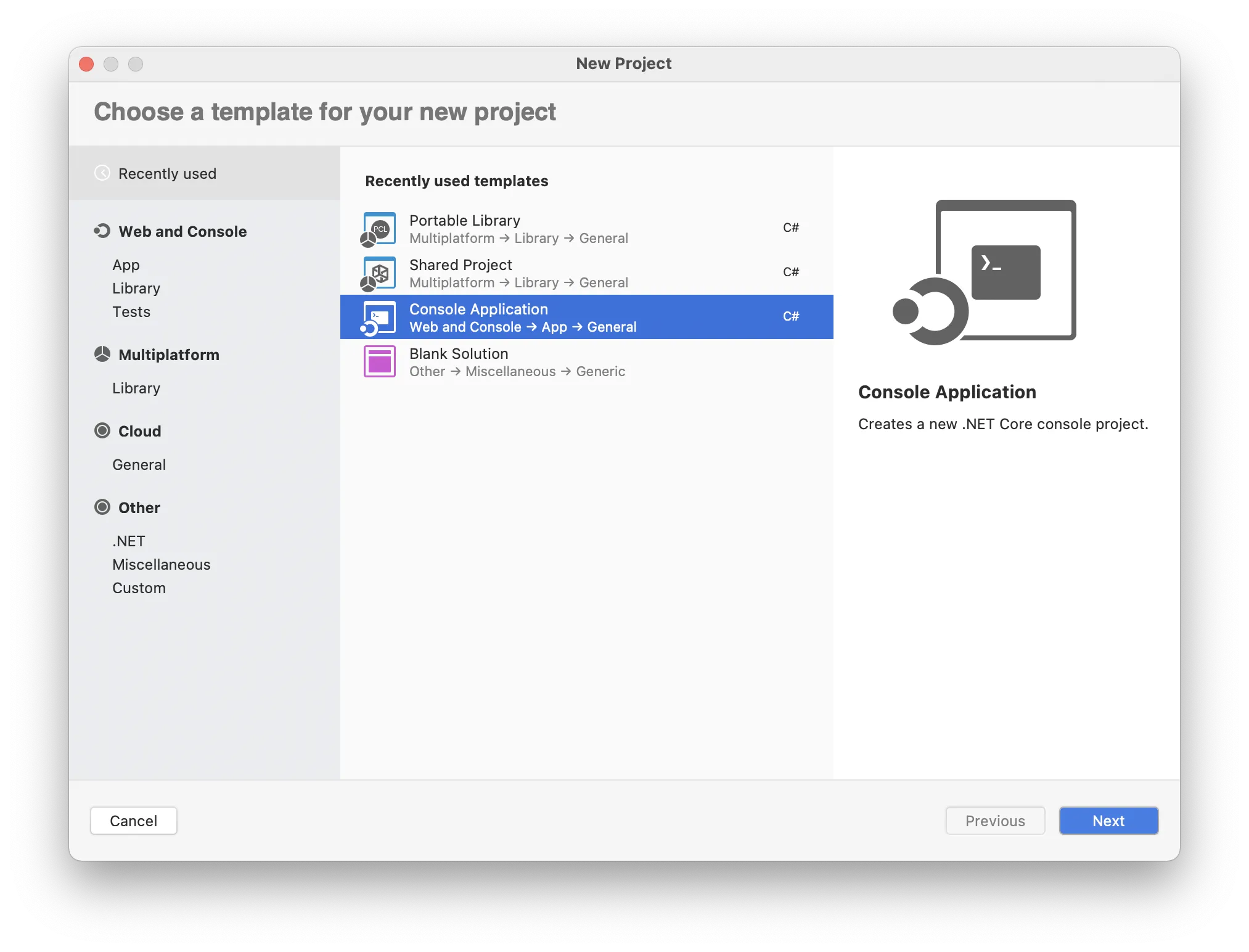
When prompted to select a target framework, select .NET 6.0.
Select a name for your project; for example, "Tasks."
Adding Ditto to the Project
We've deployed Ditto for C# on the standard NuGet package repository. We will need to add Ditto to this project.
Right click the project's Dependencies folder, and click _Manage NuGet Dependencies.
Search for "Ditto" in the search bar and add the package called "Ditto" by "Ditto". Ensure not to mistake it for another package.
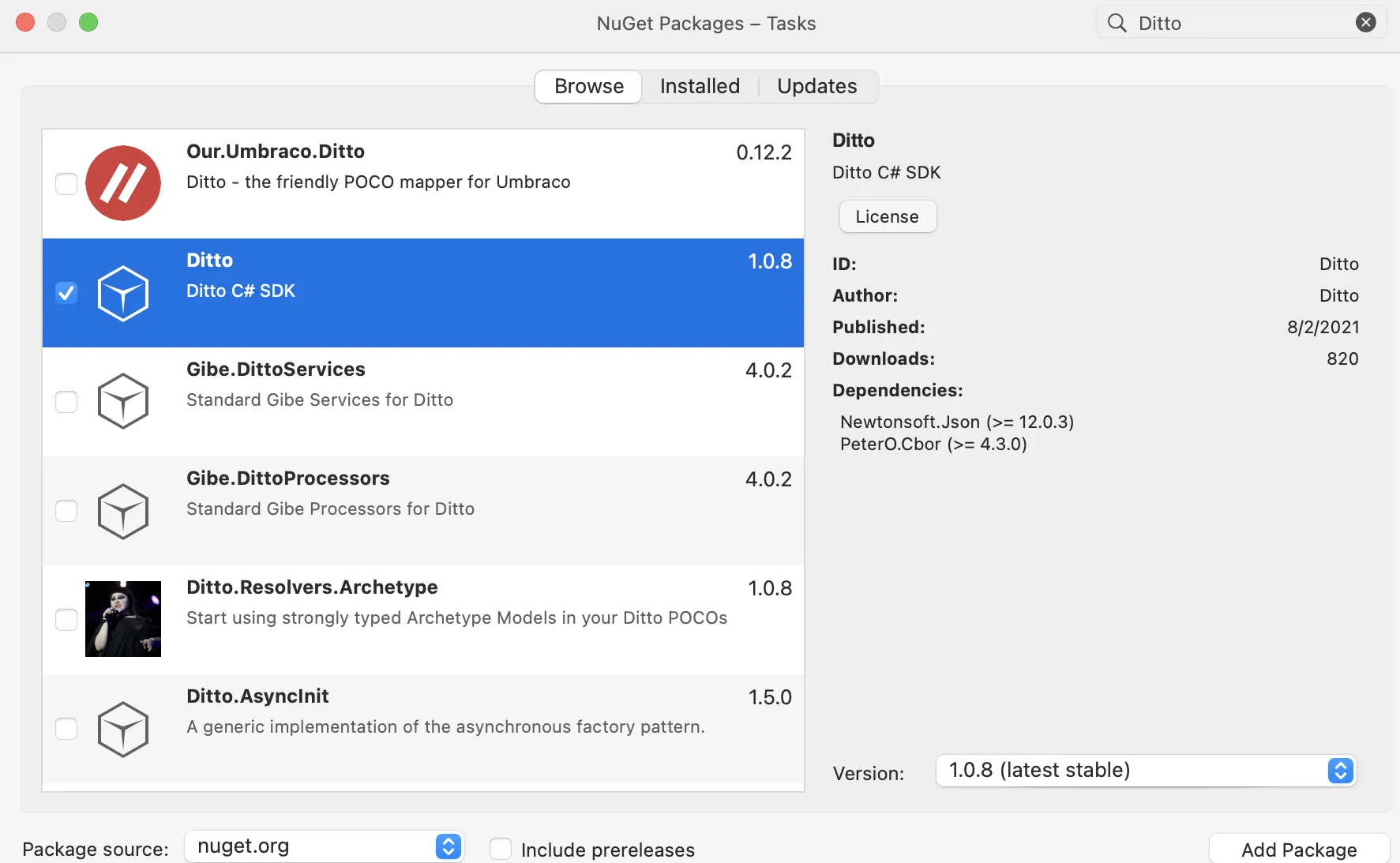
If you prefer a different way of installation, feel free to take a look at the alternative ways to install or reference the NuGet page here.
Install-Package DittoIn your Program.cs file, add using DittoSDK and using System.Collections.Generic to the top of the file like so:
using System;
using DittoSDK;
using System.Collections.Generic;Now we'll need to hold a reference to our Ditto instance as a static variable and also add a static DittoLiveQuery and static DittoSubscription variable.
These variables must be static because the console program's Main function is also static.
Instantiate the ditto static variable by constructing it with a development identity with an appID: "live.ditto.tasks". If you want to sync with other tutorial app types like iOS or Android, you'll need to match the appID to enable sync.
namespace Tasks
{
    class Program
    {
        // 4.
        static Ditto ditto;
        static DittoLiveQuery liveQuery;
        static DittoSubscription subscription;

        public static void Main(params string[] args)
        {
          // 5.
          ditto = new Ditto(identity: DittoIdentity.OnlinePlayground("REPLACE_ME_WITH_YOUR_APP_ID", "REPLACE_ME_WITH_YOUR_PLAYGROUND_TOKEN"), path);

          try
          {
              ditto.StartSync();
          }
          catch (DittoException ex)
          {
              Console.WriteLine("There was an error starting Ditto.");
              Console.WriteLine("Here's the following error");
              Console.WriteLine(ex.ToString());
              Console.WriteLine("Ditto cannot start sync but don't worry.");
              Console.WriteLine("Ditto will still work as a local database.");
          }
          Console.WriteLine("Welcome to Ditto's Task App");
        }
    }
}
Creating a Task.cs File
Ditto documents have a flexible structure. Oftentimes, in strongly-typed languages like C#, we will create a data structure give more definition to the app. Create a new C# file named "Task.cs" in your project.
In the new file, you'll need to reference System, System.Collections.Generic and DittoSDK.
Add the matching variables string _id, string body, and bool isCompleted to the struct. We will use this to match the document values to to the struct.
Add an constructor to Task that takes in a DittoDocument. In the constructor, parse out the document's keys with Ditto's type safe value accessors. This will safely map all the document's values to the struct's variables that we created in step 2. In addition we will add a couple of other constructor overloads for easier creation of data.
Override the ToString() method of the struct. We will later use this to easily print out a more readable string that we can use in Console.WriteLine back in the main Program.cs.
Add a function to the struct called ToDictionary which will serialize the values into a Dictionary<string, object>.
This will assist us later when we need to insert a new document into Ditto.
// 1.
using System;
using System.Collections.Generic;
using DittoSDK;

namespace Tasks
{
    public struct Task
    {
        string _id;
        string body;
        bool isCompleted;

        // 3
        public Task(string _id, string body, bool isCompleted)
        {
            this._id = _id;
            this.body = body;
            this.isCompleted = isCompleted;
        }

        public Task(string body, bool isCompleted)
        {
            this._id = Guid.NewGuid().ToString();
            this.body = body;
            this.isCompleted = isCompleted;
        }

        public Task(DittoDocument document)
        {
            this._id = document["_id"].StringValue;
            this.body = document["body"].StringValue;
            this.isCompleted = document["isCompleted"].BooleanValue;
        }

        // 4.
        public override string ToString()
        {
            return $"Task _id: {_id}, body: {body}, isCompleted: {isCompleted}";
        }

        // 5.
        public Dictionary<string, object> ToDictionary()
        {
            return new Dictionary<string, object>
            {
                { "_id", _id },
                { "body", body },
                { "isCompleted", isCompleted },
            };
        }
        // 5.
    }
}
Configuring Commands
Unlike many UI applications, Console or Command Line applications have limitations to user interactions. For example, console applications typically read text commands during a while loop as a standard design pattern. This section will outline the command line design and set up the loop to allow the user to give continual commands.
Designing the Commands
Our Tasks Console app will have five commands that map to Ditto and general console commands. We will need:
--insert to allow the user to .insert a new document into the ditto.collection('tasks") collection
--toggle to allow the user to .update a new document's bool isCompleted property by its _id.
--delete to allow the user to .remove a new document by its _id.
--list will print every current Task that we have in the collection. In addition, we will always call this method before every item.
--exit will quit the console app.
As a best practice, long-running console applications should continuously print the primary set of commands as long as they are succinct. We'll create a utility method called ListCommands() which, will Console.WriteLine each of the commands.
using System;
using DittoSDK;
using System.Collections.Generic;

namespace Tasks
{
    class Program
    {

      public static void Main(params string[] args)
      {
        ditto = new Ditto(DittoIdentity.OnlinePlayground("REPLACE_ME_WITH_YOUR_APP_ID", "REPLACE_ME_WITH_YOUR_PLAYGROUND_TOKEN"), path);

        // ... omitted for brevity
        // see `setup`
      }

      public static void ListCommands()
      {
          Console.WriteLine("************* Commands *************");
          Console.WriteLine("--insert my new task");
          Console.WriteLine("   Inserts a task");
          Console.WriteLine("   Example: \"--insert Get Milk\"");
          Console.WriteLine("--toggle myTaskTd");
          Console.WriteLine("   Toggles the isComplete property to the opposite value");
          Console.WriteLine("   Example: \"--toggle 1234abc\"");
          Console.WriteLine("--delete myTaskTd");
          Console.WriteLine("   Deletes a task");
          Console.WriteLine("   Example: \"--delete 1234abc\"");
          Console.WriteLine("--list");
          Console.WriteLine("   List the current tasks");
          Console.WriteLine("--exit");
          Console.WriteLine("   Exits the program");
          Console.WriteLine("************* Commands *************");
      }
    }
}
Observing the Tasks with a Live Query
As we insert, update, and delete our tasks, we will update the Tasks collection. To sync changes coming from other devices, we will need create a Live Query by calling .Observe.
Remember Ditto will only sync with devices by calling .Observe on queries. The .Observe method will return a DittoLiveQuery object. As long as the DittoLiveQuery object stays in scope and is not garbage collected, the Live Query will fire for any changes to the tasks collection.
Remember, the .Observe callback will fire for both local changes and remote changes.
DittoLiveQuery liveQuery = ditto.Store["tasks"].Find("!isDeleted").ObserveLocal((docs, _event) => {
  // this will fire for all changes synchronized to the store.
});
In the context of our console application, we need to:
Store a List<Task> as a static variable so that we can print it upon command.
.Observe all the document in the tasks collection. Take care to store the DittoLiveQuery as a static variable as well.
In the .Observe callback, convert all the List<DittoDocument> docs into List<Task> and assign them to both variables detailed in step 1 and 2.
using System;
using DittoSDK;
using System.Collections.Generic;

namespace Tasks
{
    class Program
    {
        static Ditto ditto;

        // 1.
        static List<Task> tasks = new List<Task>();
        // 2.
        static DittoLiveQuery liveQuery;
        static DittoSubscription subscription;


        public static void Main(params string[] args)
        {
            ditto = new Ditto(DittoIdentity.OnlinePlayground("REPLACE_ME_WITH_YOUR_APP_ID", "REPLACE_ME_WITH_YOUR_PLAYGROUND_TOKEN"), path);

            try
            {
                ditto.StartSync();
            }
            catch (DittoException ex)
            {
                Console.WriteLine("There was an error starting Ditto.");
                Console.WriteLine("Here's the following error");
                Console.WriteLine(ex.ToString());
                Console.WriteLine("Ditto cannot start sync but don't worry.");
                Console.WriteLine("Ditto will still work as a local database.");
            }

            Console.WriteLine("Welcome to Ditto's Task App");

            // 3.
            subscription = ditto.Store["tasks"].Find("!isDeleted").Subscribe()
            liveQuery = ditto.Store["tasks"].Find("!isDeleted").ObserveLocal((docs, _event) => {
                tasks = docs.ConvertAll(document => new Task(document));
            });
        }

        public static void ListCommands() {
          // omitted for brevity
        }
    }
}
We have all the basic building blocks for syncing tasks to a locally stored List<Task> variable. In the following section, we will go over how to map the user commands to actual Ditto live query, insert, update and delete methods.
Setting up the while Loop
To determine whether or not the while loop should run, we need an addition static bool isAskedToExit = false. If the user turns this to true via the --exit command, the while loop will stop and the application will exit.
In each iteration of the while loop, we will need read the command from the user. In C#, we can use the Console.ReadLine API, which will prompt the user for a string entry. We can store this into string command.
We can add a switch statement which will parse the correct command and react to the command.
If the user types in --insert, we will parse out the string without the --insert command. We assume this string is the body for a new document. So we will call the .upsert command with ditto via:
string taskBody = s.Replace("--insert ", "");
ditto.Store["tasks"].Upsert(new Task(taskBody, false).ToDictionary());Check for a switch case for --toggle. We will parse out the string without --toggle and assume the user's input is a Task document's _id. We can then find the document by its _id and call .update.
Check for a switch case for --delete. We will parse out the string without --delete and assume the user's input is a Task document's _id. We can then find the document by its _id and call .update.
Finally we will add a command to look for --list, which will print out all the tasks that we've synced.
using System;
using DittoSDK;
using System.Collections.Generic;

namespace Tasks
{
    class Program
    {
        static Ditto ditto;
        // 1.
        static bool isAskedToExit = false;
        static List<Task> tasks = new List<Task>();
        static DittoLiveQuery liveQuery;
        static DittoSubscription subscription;


        public static void Main(params string[] args)
        {
            ditto = new Ditto(DittoIdentity.OnlinePlayground("REPLACE_ME_WITH_YOUR_APP_ID", "REPLACE_ME_WITH_YOUR_PLAYGROUND_TOKEN"), path);

            /**
            * Omitted for brevity
            */

            subscription = ditto.Store["tasks"].Find("!isDeleted").Subscribe()

            liveQuery = ditto.Store["tasks"].Find("!isDeleted").ObserveLocal((docs, _event) => {
                tasks = docs.ConvertAll(d => new Task(d));
            });

            ditto.Store["tasks"].Find("isDeleted == true").Evict();

            ListCommands();

            while (!isAskedToExit)
            {

                // 2.
                Console.Write("\nYour command: ");
                string command = Console.ReadLine();

                switch (command)
                {

                    // 3. 4.
                    case string s when command.StartsWith("--insert"):
                        string taskBody = s.Replace("--insert ", "");
                        ditto.Store["tasks"].Upsert(new Task(taskBody, false).ToDictionary());
                        break;
                    // 5.
                    case string s when command.StartsWith("--toggle"):
                        string _idToToggle = s.Replace("--toggle ", "");
                        ditto.Store["tasks"]
                            .FindById(new DittoDocumentId(_idToToggle))
                            .Update((mutableDoc) => {
                                if (mutableDoc == null) return;
                                mutableDoc["isCompleted"].Set(!mutableDoc["isCompleted"].BooleanValue);
                            });
                        break;
                    // 6.
                    case string s when command.StartsWith("--delete"):
                        string _idToDelete = s.Replace("--delete ", "");
                        ditto.Store["tasks"]
                            .FindById(new DittoDocumentId(_idToDelete))
                            .Update((mutableDoc) => {
                                if (mutableDoc == null) return;
                                mutableDoc["isDeleted"].Set(true);
                            });
                        break;
                    case { } when command.StartsWith("--list"):
                        tasks.ForEach(task =>
                        {
                            Console.WriteLine(task.ToString());
                        });
                        break;
                    // 1.
                    case { } when command.StartsWith("--exit"):
                        Console.WriteLine("Good bye!");
                        isAskedToExit = true;
                        break;
                    default:
                        Console.WriteLine("Unknown command");
                        ListCommands();
                        break;
                }
            }
        }
    }
}
Reviewing Program.cs
Our application is complete! Our Program.cs file should look like the following. Now you can run the example in your terminal, command line or right within the run command in Visual Studio.
using System;
using DittoSDK;
using System.Collections.Generic;

namespace Tasks
{
    class Program
    {
        static Ditto ditto;
        static bool isAskedToExit = false;
        static List<Task> tasks = new List<Task>();
        static DittoLiveQuery liveQuery;
        static DittoSubscription subscription;


        public static void Main(params string[] args)
        {
            ditto = new Ditto(DittoIdentity.OnlinePlayground("REPLACE_ME_WITH_YOUR_APP_ID", "REPLACE_ME_WITH_YOUR_PLAYGROUND_TOKEN"), path);

            try
            {
                DittoTransportConfig transportConfig = new DittoTransportConfig();

                // Enable Local Area Network Connections
                transportConfig.EnableAllPeerToPeer();

                // Listen for incoming connections on port 4000
                transportConfig.Listen.Tcp.Enabled = true;
                transportConfig.Listen.Tcp.InterfaceIp = "0.0.0.0";
                transportConfig.Listen.Tcp.Port = 4000;

                // Connect explicitly to a remote device on
                transportConfig.Connect.TcpServers.Add("135.1.5.5:12345");
                // you can add as many TcpServers as you would like.
                transportConfig.Connect.TcpServers.Add("185.1.5.5:12345");

                ditto.TransportConfig = transportConfig;

                ditto.StartSync();
            }
            catch (DittoException ex)
            {
                Console.WriteLine("There was an error starting Ditto.");
                Console.WriteLine("Here's the following error");
                Console.WriteLine(ex.ToString());
                Console.WriteLine("Ditto cannot start sync but don't worry.");
                Console.WriteLine("Ditto will still work as a local database.");
            }

            Console.WriteLine("Welcome to Ditto's Task App");

            subscription = ditto.Store["tasks"].Find("!isDeleted").Subscribe();

            liveQuery = ditto.Store["tasks"].Find("!isDeleted").ObserveLocal((docs, _event) => {
                tasks = docs.ConvertAll(document => new Task(document));
            });

            ditto.Store["tasks"].Find("isDeleted == true").Evict();

            ListCommands();

            while (!isAskedToExit)
            {

                Console.Write("\nYour command: ");
                string command = Console.ReadLine();

                switch (command)
                {

                    case string s when command.StartsWith("--insert"):
                        string taskBody = s.Replace("--insert ", "");
                        ditto.Store["tasks"].Upsert(new Task(taskBody, false).ToDictionary());
                        break;
                    case string s when command.StartsWith("--toggle"):
                        string _idToToggle = s.Replace("--toggle ", "");
                        ditto.Store["tasks"]
                            .FindById(new DittoDocumentId(_idToToggle))
                            .Update((mutableDoc) => {
                                if (mutableDoc == null) return;
                                mutableDoc["isCompleted"].Set(!mutableDoc["isCompleted"].BooleanValue);
                            });
                        break;
                    case string s when command.StartsWith("--delete"):
                        string _idToDelete = s.Replace("--delete ", "");
                        ditto.Store["tasks"]
                            .FindById(new DittoDocumentId(_idToDelete))
                            .Update((mutableDoc) => {
                                if (mutableDoc == null) return;
                                mutableDoc["isDeleted"].Set(true);
                            });
                        break;
                    case { } when command.StartsWith("--list"):
                        tasks.ForEach(task =>
                        {
                            Console.WriteLine(task.ToString());
                        });
                        break;
                    case { } when command.StartsWith("--exit"):
                        Console.WriteLine("Good bye!");
                        isAskedToExit = true;
                        break;
                    default:
                        Console.WriteLine("Unknown command");
                        ListCommands();
                        break;
                }
            }
        }

        public static void ListCommands()
        {
            Console.WriteLine("************* Commands *************");
            Console.WriteLine("--insert my new task");
            Console.WriteLine("   Inserts a task");
            Console.WriteLine("   Example: \"--insert Get Milk\"");
            Console.WriteLine("--toggle myTaskTd");
            Console.WriteLine("   Toggles the isComplete property to the opposite value");
            Console.WriteLine("   Example: \"--toggle 1234abc\"");
            Console.WriteLine("--delete myTaskTd");
            Console.WriteLine("   Deletes a task");
            Console.WriteLine("   Example: \"--delete 1234abc\"");
            Console.WriteLine("--list");
            Console.WriteLine("   List the current tasks");
            Console.WriteLine("--exit");
            Console.WriteLine("   Exits the program");
            Console.WriteLine("************* Commands *************");
        }
    }
}