Get Started
'Hello, World!' Sync
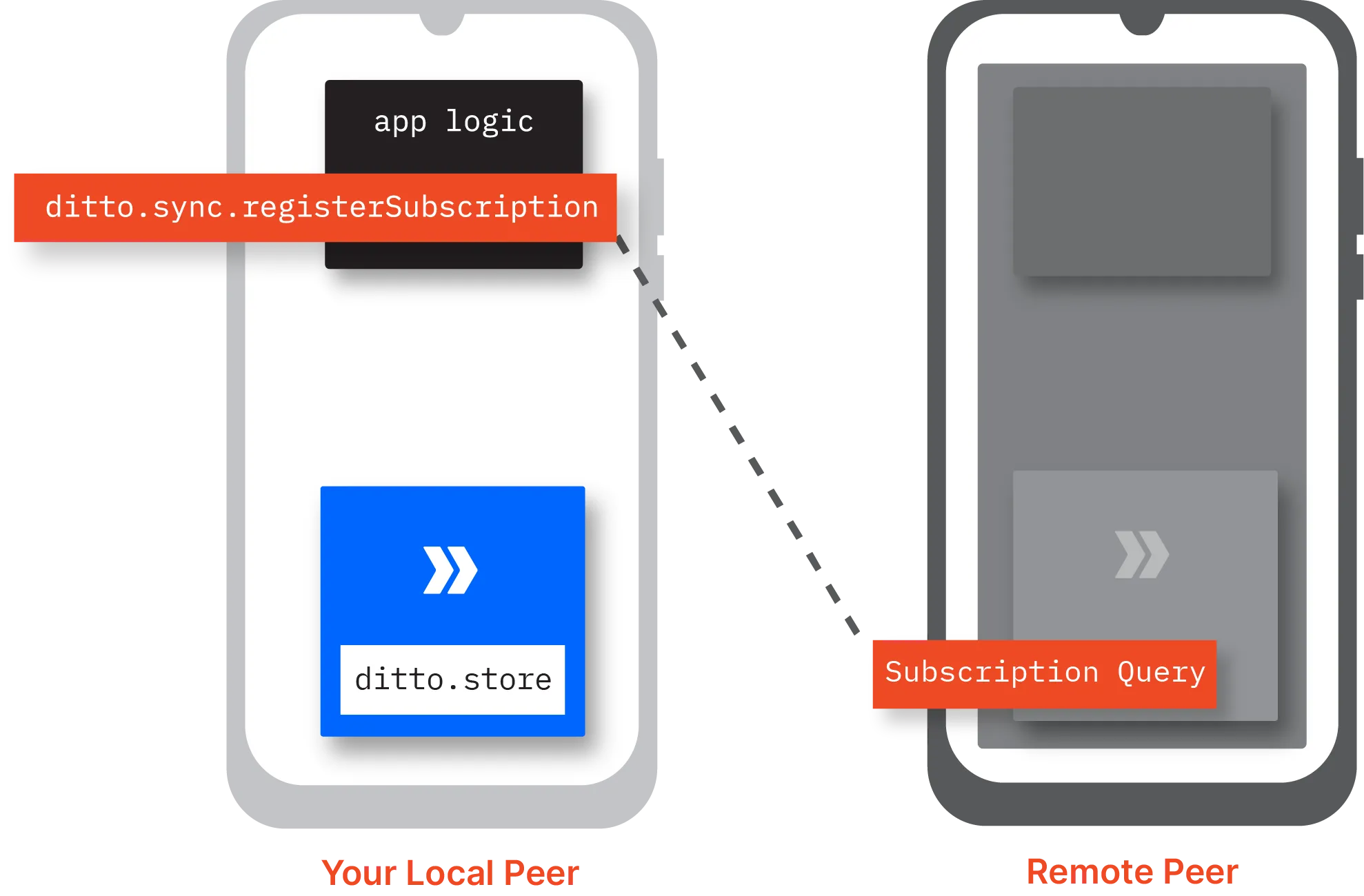
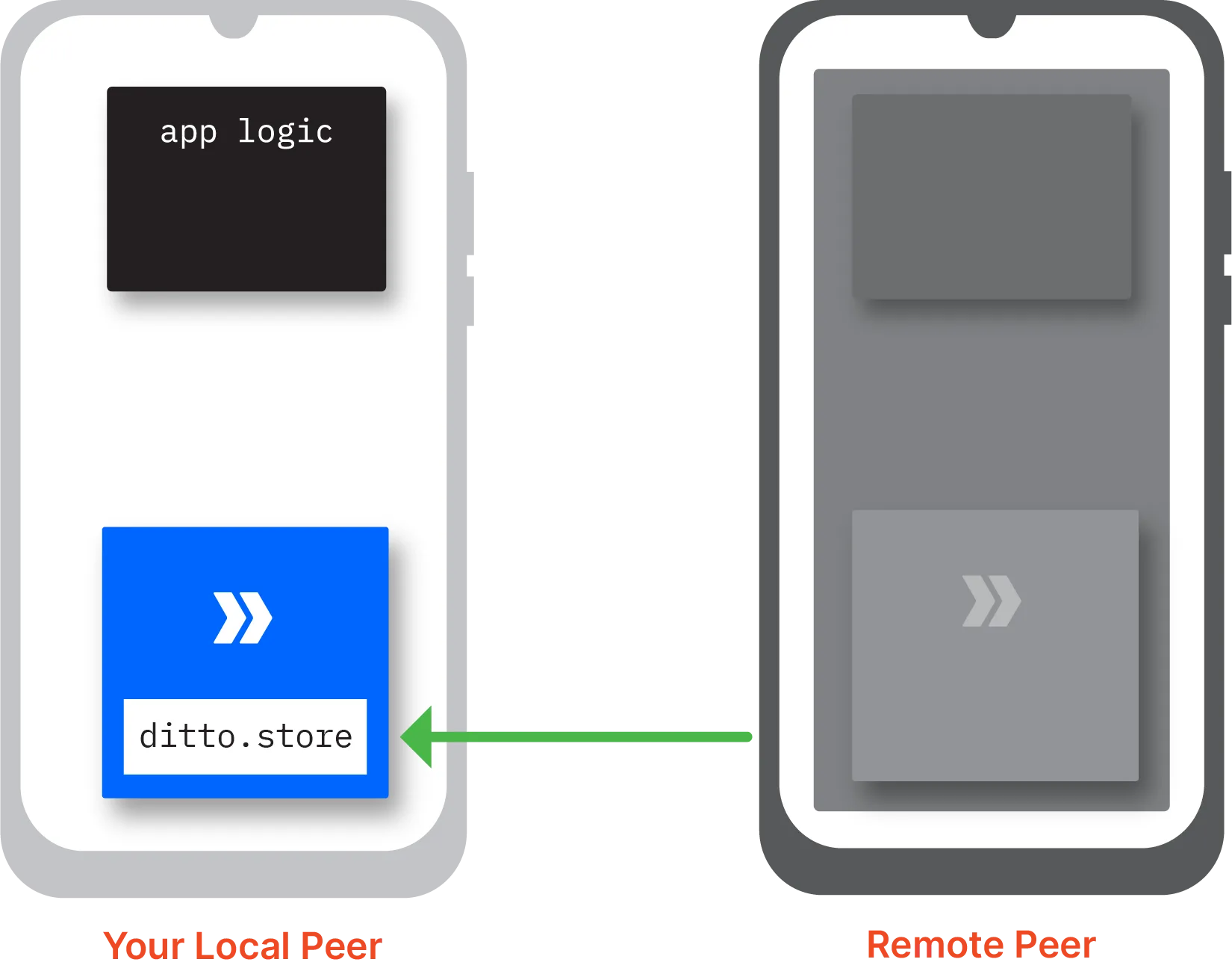
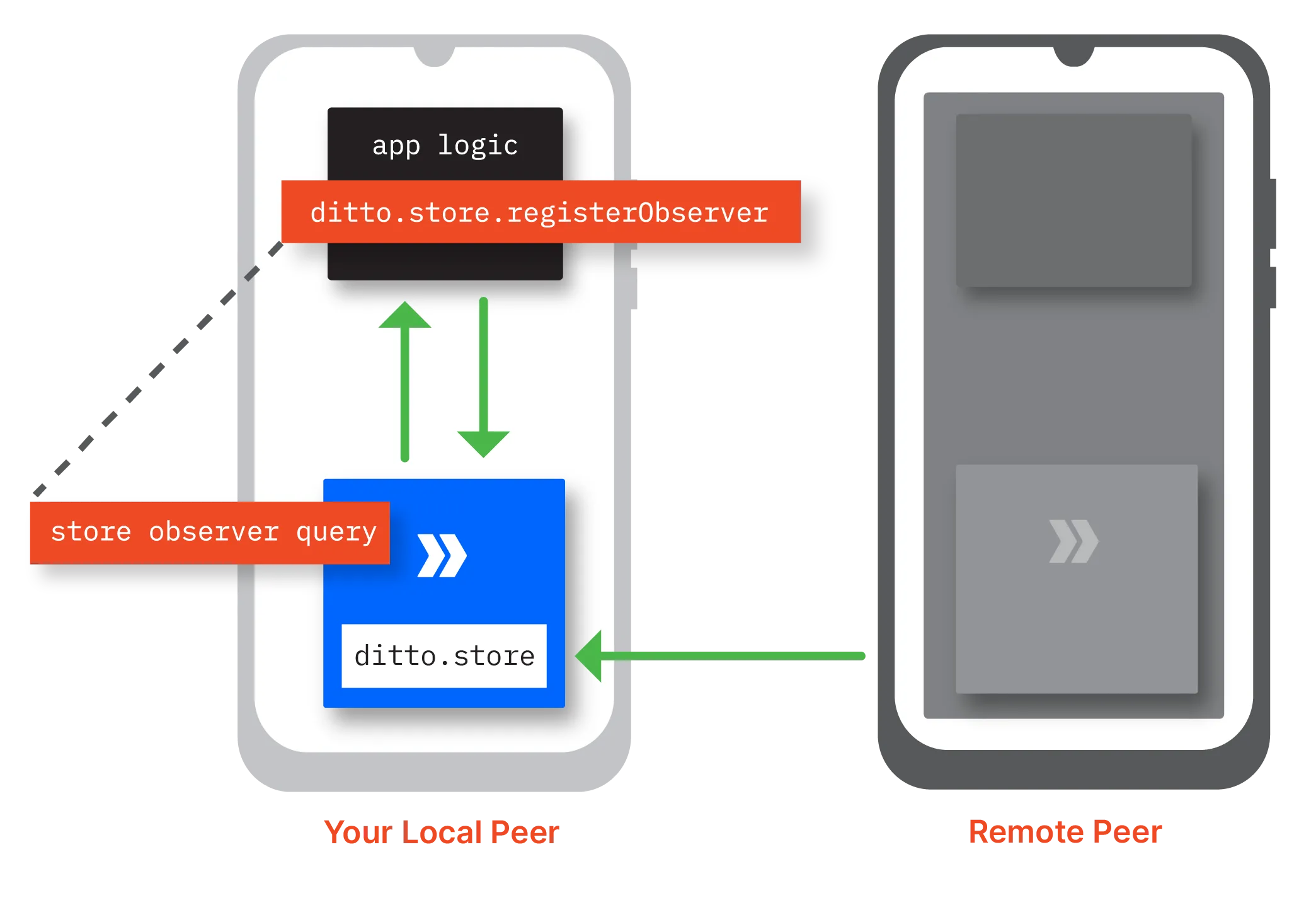
once you've set up your environment, try on ditto and perform your first peer ‑ to ‑ peer sync intended to get you oriented, this article provides a streamlined process for integrating sync functionality within your app if you prefer building and exploring through a task app, chat app, and so on, see docid\ hml3nunwo5k313jku wyz integrating sync functionality before you can begin syncing data offline, set up authentication and then start the sync process from the top most scope of your app's codebase, add the following to set up authentication and start syncing offline dittologger minimumloglevel = debug let ditto = ditto(identity onlineplayground( appid "your app id", token "your playground token" )) do { try ditto startsync() } catch (let err) { print(err localizeddescription) }try { val androiddependencies = defaultandroiddittodependencies(context) val identity = dittoidentity onlineplayground( androiddependencies, appid = "your app id", token = "your playground token" ) dittologger minimumloglevel = dittologlevel debug ditto = ditto(androiddependencies, identity) ditto startsync() } catch (e dittoerror) { log e("ditto error", e message!!) }import { ditto } from "@dittolive/ditto" const identity = { type 'onlineplayground', appid 'your app id', token 'your playground token' } const ditto = new ditto(identity) await ditto startsync()dittodependencies androiddependencies = new defaultandroiddittodependencies(this context); dittologger setminimumloglevel(dittologlevel debug); dittoidentity identity = new dittoidentity onlineplayground(androiddependencies, "your app id", "your playground token"); ditto ditto = new ditto(androiddependencies, identity); try { ditto startsync(); } catch(dittoerror e) { //handle error }try { dittologger setminimumloglevel(dittologlevel debug); var ditto = new ditto(dittoidentity onlineplayground("your app id", "your playground token", true), path); ditto startsync(); } catch (dittoexception ex) { console writeline($"ditto error {ex message}"); }auto identity = identity onlineplayground("your app id", "your playground token", true); try { ditto ditto = ditto(identity, dir); ditto set minimum log level(loglevel debug); ditto start sync(); } catch (const dittoerror \&err) { }// app id and playground token are read from env variables let your app id = appid from env("ditto app id")?; let your playground token = std env var("ditto playground token")?; let ditto = ditto builder() // store peer data in a directory next to the executable with root(arc new(persistentroot from current exe()?)) with minimum log level(loglevel debug) with identity(move |ditto root| { let enable cloud sync = true; let custom auth url = none; onlineplayground new( ditto root, your app id, your playground token, enable cloud sync, custom auth url, ) })? build()?; ditto start sync()?; dart(beta) import 'package\ ditto live/ditto live dart'; final datadir = await getapplicationdocumentsdirectory(); final persistencedirectory = directory("${datadir path}/ditto"); await persistencedirectory create(recursive true); final ditto = await ditto open( identity identity, persistencedirectory persistencedirectory, ); await ditto startsync(); replace your app id and your playground token with your access credentials available from the https //portal ditto live/? gl=1 gbyc26 ga mjaxodm3oduymi4xnze4njuznzyz ga d8pmw3ccl2 mtcxodcynju1ms41ljeumtcxodcynjkzmi42mc4wlja (see docid\ ymrwjnmdrnovdt3qbptxk ) inserting documents i nsert a document in your local ditto store by calling the execute api method on the store namespace with a local insert into query, specifying the document to insert for example, inserting a new document with a single field "color" set to "blue" await ditto store execute( query "insert into cars documents (\ newcar)", arguments \["newcar" \["color" "blue"]]);ditto store execute( "insert into cars documents (\ newcar)", mapof("newcar" to mapof("color" to "blue")))await ditto store execute( "insert into cars documents (\ newcar)", { newcar { color "blue" } } );dittoqueryresult result = (dittoqueryresult) ditto store execute( "insert into cars documents (\ newcar)", collections singletonmap("newcar", collections singletonmap("color", "blue")), );var args = new dictionary\<string, object>(); args add("newcar", new { color = "blue" }); await ditto store executeasync( "insert into cars documents (\ newcar)", args);std map\<std string, std map\<std string, std string>> args; args\["newcar"] = {{"color", "blue"}}; ditto get store() execute( "insert into cars documents (\ newcar)", args);let query result = ditto store() execute( "insert into cars documents (\ newcar)", some(serde json json!({ "newcar" { "color" "blue" } }) into()), ) await?;await ditto store execute( "insert into cars documents (\ newcar)", arguments {"newcar" {"color" "blue"}}, ); setting up store observers establish a local listener, known as a store observer , for realtime monitoring and response to updates in your local ditto store for example, you can set up a store observer to asynchronously display profile updates to end users when they modify their profiles to set up a store observer call the register observer api method on the store namespace include a local select query specifying the document collection you want to watch and define a callback function to handle changes for example, watching documents from the cars collection in the ditto store observer = ditto store registerobserver( query "select from cars"){ result in / handle change / };observer = ditto store registerobserver("select from cars") { result > / handle change / };ditto store registerobserver( "select from cars", (result) => { // handle change });observer = ditto store registerobserver( "select from cars", result > { // handle change } );// without arguments result = await ditto store registerobserver( "select from cars", (result) => { // handle change }); // with arguments result = ditto store registerobserver( "select from cars", (result) => { // handle change }); observer = ditto get store() register observer( "select from cars", \[&]\(queryresult result) { / handle change / });observer = ditto store() register observer( "select from cars", none, move |result queryresult| { // handle change })?; dart(beta) final observer = await ditto store registerobserver("select from cars"); observer changes listen((result) { // handle change }); please note that the observer must be kept in scope (i e as a property in a class) for as long as you wish to have your event handler be called when there is an update to a document matching the query you provide creating subscriptions r egister a remote listener, known as a sync subscription , by calling the register subscription api method on the sync namespace f or example, creating a subscription to sync updates made to documents in th e cars collection with color set to blue ditto sync registersubscription("select from cars where color = 'blue'")ditto sync registersubscription("select from cars where color = 'blue'")ditto sync registersubscription("select from cars where color = 'blue'")ditto sync registersubscription("select from cars where color = 'blue'")ditto sync registersubscription("select from cars where color = 'blue'");auto subscription = ditto sync() register subscription("select from cars where color = 'blue'");let subscription = ditto sync() register subscription( "select from cars where color = 'blue'", none, )?; dart(beta) ditto sync registersubscription("select from cars where color = 'blue'"); takeaway in ditto, there is a clear distinction between traditional create , read , update , and delete (crud) database operations and data sync to perform crud, you execute local data operations against store namespace to perform sync, you execute remote data operations against the sync namespace to complete your understanding, the following graphic illustrates how sync subscriptions and store observers work together in practice before you can sync offline, you must integrate sync functionality in your codebase (see /#integrating sync functionality ) once integrated, y ou initiate a sync subscription request from your local ditto store to remote peers (see /#creating subscriptions ) t he associated query specifying the data you want to watch then propagates to each end user device connected within the mesh network when the data you've subscribed to changes on a remote peer — whether through insertions, updates, or deletions — the remote peer automatically syncs these delta changes to your local ditto store over the mesh network combining store observers with your sync subscriptions ensures that you receive updates from remote stores, enabling you to quickly respond in your app (see /#setting up store observers ) for more information, see any of the following docid\ dckm8kf7tgwdxec2m 4tq docid\ nuxtqirzyk9gye59ixzy4 docid\ mpadxpzadymecr9wunvgb docid\ ggseowatlhbgqjiui v h , docid\ pkybgoz90khrv4xojoah8 , docid 8kd9fimnxcdoqely0zihs , docid\ gvbetw19zkcbz2foj5yiu docid 0umfkr0kbp x trpqmnlt docid\ bem sphhfkspyp5zee36g docid\ dolgigpjtqb7phugvvwhx