Kafka Events: Node.js
In this article we will listen to Kafka events and pipe them to commandline process stdout.
For more information about Kafka, see Change Data Capture.
Prerequisites
- Basic understanding of Node.js.
Code Sample
See the github repository for example code to connect a Node.js instance to the Ditto Big peer as a Kafka sink to MongoDB.
Converting Certificates to the Proper Formats
First, you must download the proper Kafka certficiates and convert them to the format required by SSL via Node.js.
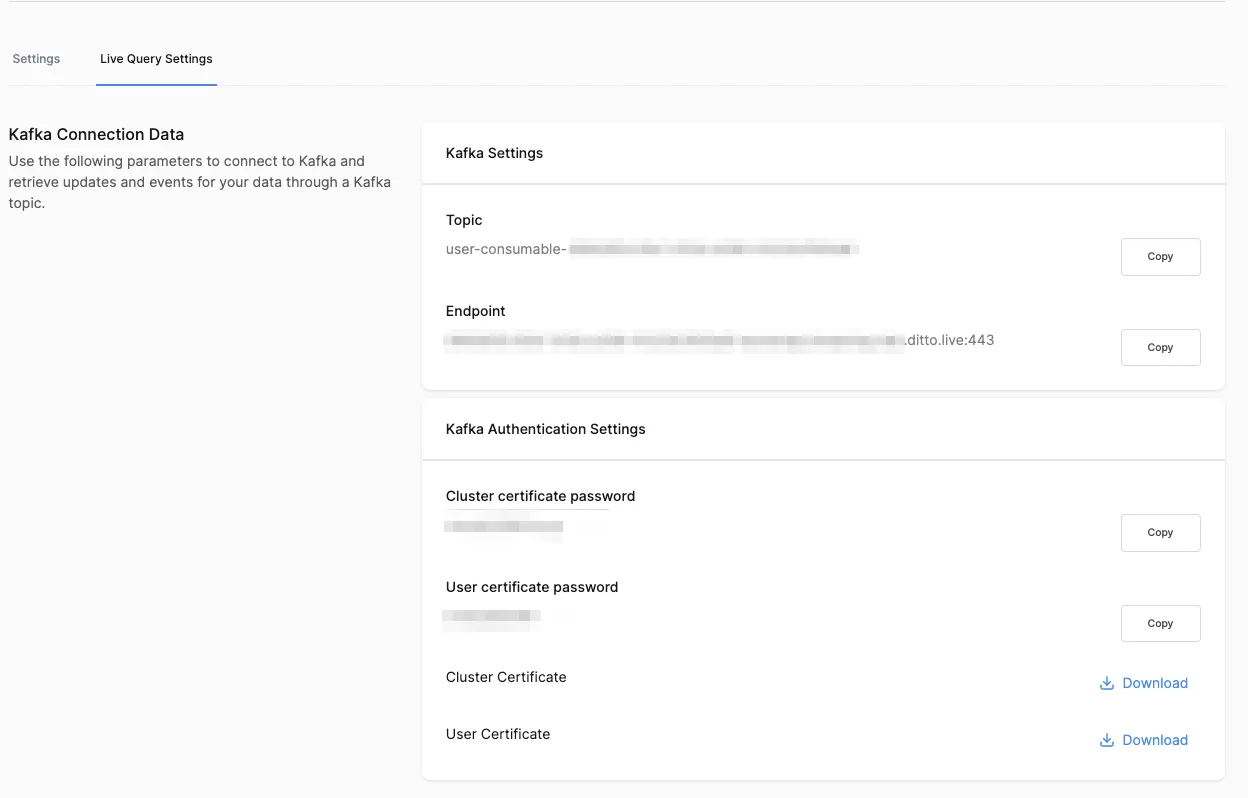
Convert the .p12 files to the required user.key, cluster.crt, and user.crt files. When propmted, use the appropriate cluster certficiate password or user password as described in the portal.
❯ openssl pkcs12 -in cluster.p12 -out cluster.crt.pem -nokeys
❯ openssl x509 -in cluster.crt.pem -out cluster.crt
❯ openssl pkcs12 -in user.p12 -out user.crt -clcerts
❯ openssl pkcs12 -in user.p12 -out user.key.pem -nocerts
❯ openssl pkey -in user.key.pem -out user.key
Decoding Transactions
All messages from the Ditto CDC are sent to your Kafka sink as JSON. First, you must decode the transaction as JSON.
try {
    const transaction = JSON.parse(message.value!.toString())
    parseTransaction(database, transaction).then(() => {
        // Success!
    }).catch(err => {
        console.error('[ERROR] Got error when parsing transaction', err)
    })
} catch (err) {
    console.error("[ERROR]: Failed to parse change", change)
}
Checking transaction.type
Each transaction has a type — Ditto has two types, requeryRequired and documentChanged.
async function parseTransaction (database: Db, transaction: DittoTransaction) {
  const collectionName = transaction.collection
  const collection = database.collection(collectionName);

  switch (transaction.type) {
    case 'requeryRequired':
        onRequeryRequired()
      return;
    case 'documentChanged':
        onDocumentChanged()
    default:
      break;
  }
}
Parsing documentChanged Events
For the onDocumentChanged function, we will parse the event into one of three possible types: Insert, Update, and Remove.
Inserting a New Document
When change.oldValue is equal to null, that means that a new document was inserted into the database.
if (transaction.change.method === 'update' && transaction.change.oldValue === null) {
  let change: DittoInsert = transaction.change
  const result = await collection.insertOne(change.newValue);
  console.log(
   `A document was inserted with the _id: ${result.insertedId}`,
  );
}
Updating an Existing Document
If change.oldValue has a value, that means that a document with the corresponding _id was updated to the value indicated in change.newValue.
if (transaction.change.method === 'upsert' && oldValue !== null) {
    let change: DittoUpdate = transaction.change
    const _id = change.oldValue._id
    const filter = { _id };
    const result = await collection.replaceOne(filter, change.newValue, {upsert: true});
    console.log(
        `${result.matchedCount} document(s) matched the filter, updated ${result.modifiedCount} document(s)`,
    );
}
Removing a Document
When change.method is equal to "remove", then the document has been deleted from Ditto.
if (transaction.change.method === 'remove') {
    let change: DittoRemove = transaction.change
    const _id = transaction.change.value._id
    const filter = { _id };
    const result = await collection.deleteOne(filter)
    console.log(
    `${result.deletedCount} document(s) matched the filter`,
    );
}
Parsing requeryRequired Event
Send an HTTP request to tell the Ditto Big Peer to catch up to the given transaction id as part of transaction.txnId and the given collection. Your HTTP endpoint will look like https://${APP_ID}.cloud.ditto.live.
function onRequeryRequired (database: Db, transaction: DittoRequeryRequired) {
  const HTTP_ENDPOINT = httpEndpoint + '/api/v3/store/find'
  for (const requeryDoc of transaction.documents) {
    const req = {
      method: 'post',
      url: HTTP_ENDPOINT,
      headers: {
        'Content-Type': 'application/json',
        'X-DITTO-TXN-ID': transaction.txnId
      },
      data: {
        "collection": transaction,
        "query": "true",
        "limit": 1
      }
    }

    axios(req).then(function (response) {
      if (response.data.message) {
        // ERROR
      } else {
        for (const doc of response.data.documents) {
          // Insert updated docs
          const mongodbCollection = database.collection(requeryDoc.collectionName);
          let missingDocument = doc as DittoHTTPDocument
          mongodbCollection.replaceOne({_id: missingDocument.id}, missingDocument)
        }
      }
    }).catch(err => {
      console.error(`[ERROR]: HTTP find request ${req}`)
      console.error(err)
    });
}