OnlineWithAuthentication
Ditto does not come with an identity provider. Using "Online With Authentication" requires that you have your own identity provider already set up. Each app can use multiple identity providers.
The "Online With Authentication" identity type is geared towards apps that will be deployed in real-world settings. "Online With Authentication" identity types are:
- for apps that need to integrate with existing permissions
- for apps that need to integrate with existing authentication systems
Ditto does not provide identity access services.
Therefore, in order to use OnlineWithAuthentication for authentication in your production‑ready app, you must first integrate a third-party identity provider for login authentication and authorization. For more information, see Platform Manual > Security.
API
To see fully working examples, see the code samples on GitHub.
Creating Your Client
Create the ditto client with the onlineWithAuthentication identity. This identity requires an authentication handler authHandler.
You must refresh the auth token when it expires. You can do that by implementing authenticationExpiringSoon. If you do not implement this, then sync will stop when the token expires.
struct AuthDelegate: DittoAuthenticationDelegate {
    func authenticationRequired(authenticator: DittoAuthenticator) {
        print("Login request.")
    }

    func authenticationExpiringSoon(authenticator: DittoAuthenticator, secondsRemaining: Int64) {
        print("Auth token expiring in \(secondsRemaining)")
    }
}

let identity = DittoIdentity.onlineWithAuthentication(
    appID: "REPLACE_ME_WITH_YOUR_APP_ID",
    authenticationDelegate: AuthDelegate()
)

let ditto = Ditto(identity: identity)
try! ditto.startSync()
Login
Login takes two parameters: the first is token. The token can be any string value. Most auth services use a JWT (JSON Web Token), but you can send any token you want from the client. For example, during testing you may want to create a secret code for development use. This string will be sent in a POST request to the HTTP route.

var res = await authenticator.Login(accessToken, "my-auth");
System.Console.WriteLine($"Login request completed. Error? {res}");
When should you call ditto.auth.login?
If you have already implemented the callbacks mentioned earlier, you don't need to take further action. Ditto will automatically attempt to refresh whenever possible. However, if you know specific times when the app will be online, you may choose to call this function manually.
For an example implementation of authentication for Android, see the Ditto open-source demo chat app's "authentication" branch in the getditto GitHub repository.
Logout
Logout will stop sync, shut down all replication sessions, and remove any cached authentication credentials. Note that this does not remove any data from the store. If you wish to delete data from the store then use the optional cleanupFn parameter to perform any required cleanup.
The cleanupFn is an optional function that will be called with the relevant Ditto instance as the sole argument that allows you to perform any required cleanup of the store as part of the logout process.
ditto.Auth.Logout((Ditto ditto) =>
{
  ditto.Store.Collection("cars").FindAll().evict();
});
Tutorial
- This section will require knowledge of writing server side HTTP endpoints and handlers. The server side sample code is written in JavaScript (NodeJS with an Express-like API), however you can use any framework or language of your choosing.
- We will use Auth0 in this tutorial. But you can use any third-party identity provider. Each app can use multiple identity providers.
- In this tutorial, you'll build a simple application so users can log in with a a third-party provider using Auth0. We assume that you have already completed the Auth0 tutorial on their documentation before starting this tutorial.
Configure Ditto
To use an "Online With Authentication" identity, go to your app in the portal and find the Authentication Mode & Webhook Settings section. Ensure that "With Authentication" is selected like so:
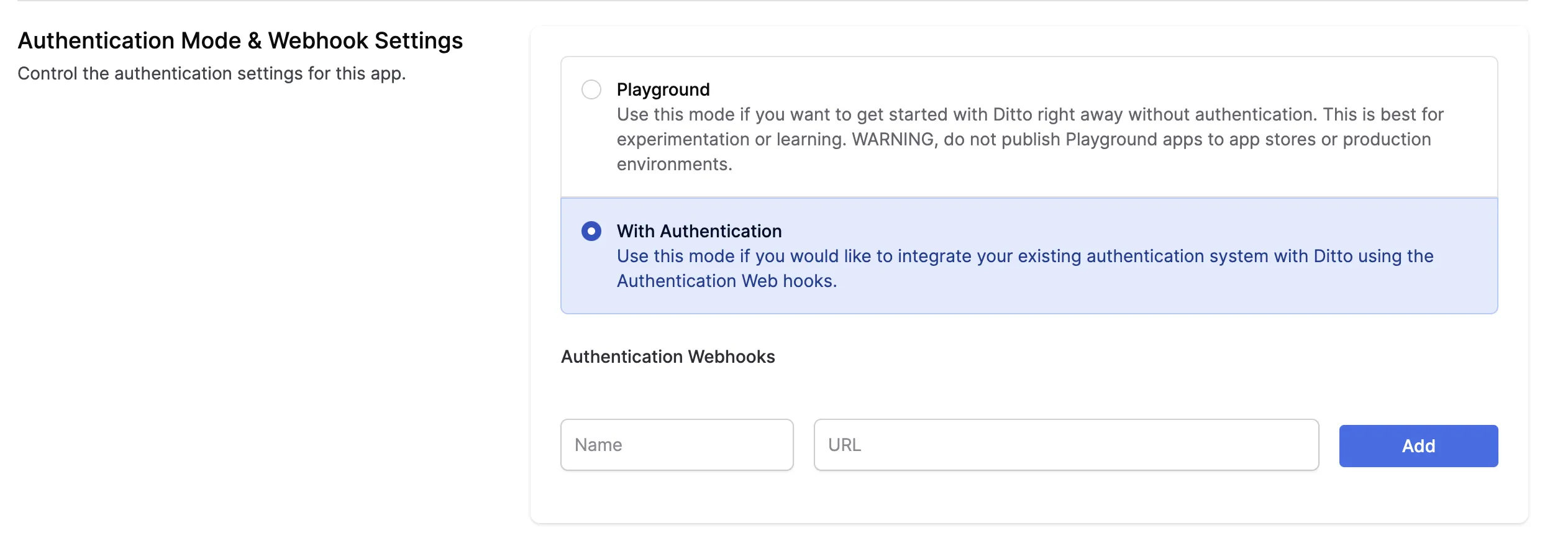
Below, a section called Authentication Webhooks will be editable. Once your Authentication Webhook Endpoint(s) is deployed and ready, you can register it in the portal. Add a Name and URL.
- Provide a unique
- The URL parameter is the fully qualified URL of the webhook that you deploy yourself. Please include https:// at the beginning of your URL.
You can use our example webhook to just get started. This webhook is a server deployed on a third-party server and is just for testing. This server will always authorize all clients with full read and write permissions.
You can use this URL to test your application. However, you should not use this URL in production. This Replit simply authenticates everyone for 7 days of offline usage.
Once configured, you should see a webhook that looks like this in your portal app settings:

Configure Auth0
The second step is to configure Auth0. Follow these steps:
- Create a new Auth0 application.
- Configure the allowed callbacks and origins for your application. Make sure to add the callback URL for your application.
- Configure the allowed grant types for your application. For this tutorial, we will use the "Authorization Code" grant type.
- Create a new API in Auth0. This will represent the API that your application will access.
Next, you need to configure Ditto. Follow the steps that were outlined earlier in this article.
Now that you have configured Auth0 and Ditto, you can start integrating them into your application.
If you already have an Auth0 account...
...log in, skip the next section, and proceed to the part titled Register your app with Auth0.
If you don't have an Auth0 account yet...
...you can sign up for one here - it's free.
Register your app with Auth0
- In the menu on the left side of the Auth0 dashboard, click on Applications. This will expand the Applications menu. Select the first item in that menu, which also has the name Applications. You will now be on the Applications page. It lists all the applications that you have registered so that Auth0 can handle their login/logout processes.
- Create a new registration for your app. Do this by clicking the Create application button near the top right of the page.
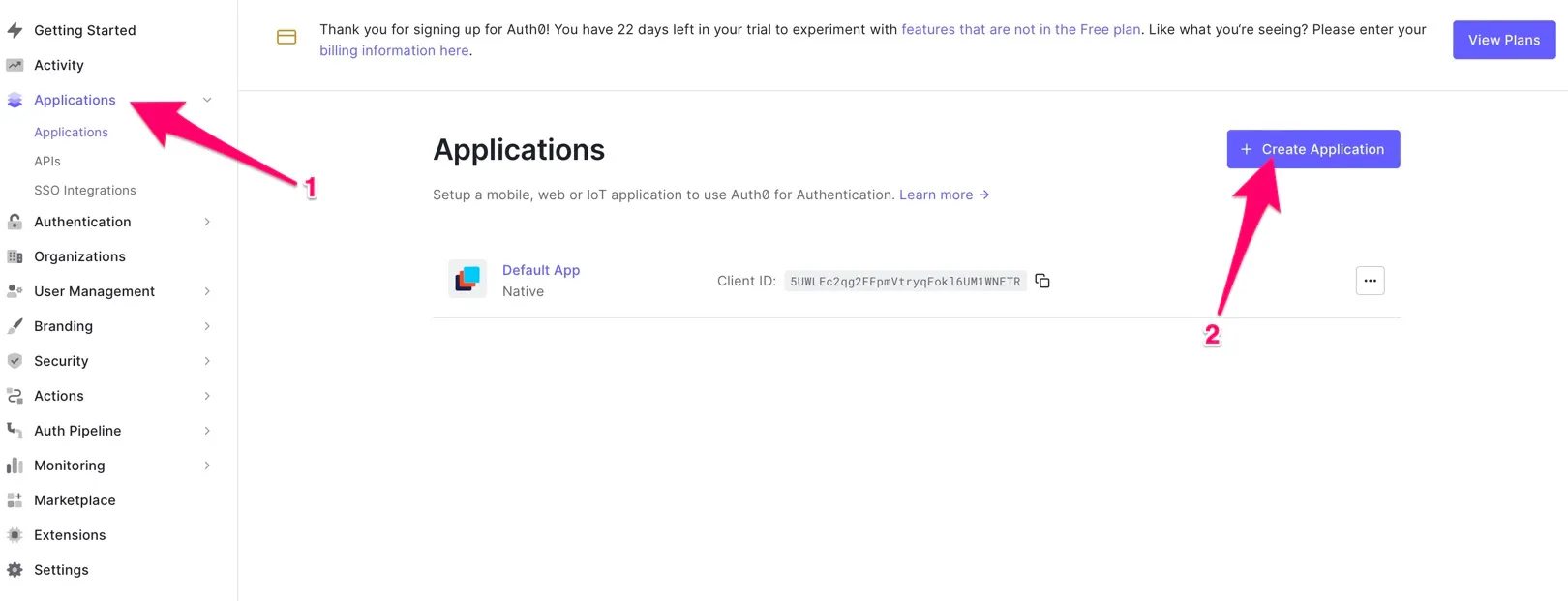
You can follow the prompts and instructions on the Auth0 site for more details. From the Auth0 portal you will need to retrieve the following information for your Android app:
- Domain
- Client ID
You can store these as String resources in your app. On the Auth0 portal, you will need to build your callback URL and logout URL. Again, see the Auth0 website for details on how to do this.
References
Integrating Auth0 with Ditto
Assuming you have a login button in the HTML:
<button onClick={login}>Login</button>We attach a login function to the button.
import createAuth0Client from '@auth0/auth0-spa-js';
// OR for React
import { useAuth0 } from '@auth0/auth0-react';

// configure your auth0 client...

async function login () {
  await auth0.loginWithRedirect({
    redirect_uri: window.location.origin
  });
  startDitto()
}
We can then create a startDitto function that gets the access token and starts a new Ditto instance, and passes the token to your server route you created in the previous section.
The provider name given to the Ditto Client must match a provider name in the Portal (e.g., replit-auth).
import createAuth0Client from '@auth0/auth0-spa-js';
// OR for React
import { useAuth0 } from '@auth0/auth0-react';
import { init, Ditto } from "@dittolive/ditto"

// configure your auth0 client...

let ditto

(async () => {
  await init() // you need to call this at least once before using any of the Ditto API

  function startDitto () {
    let token = await auth0.getAccessTokenSilently();

    const authHandler = {
      authenticationRequired: async function(authenticator) {
        await authenticator.login(token, "replit-auth");
        console.log("Login request completed.");
      },
      authenticationExpiringSoon: function(authenticator, secondsRemaining) {
        console.log(`Auth token expiring in ${secondsRemaining} seconds`)
        await authenticator.login(token, "replit-auth");
        console.log("Login request completed.");
      }
    }

    const identity = {
      type: 'onlineWithAuthentication',
      appID: 'REPLACE_ME_WITH_YOUR_APP_ID',
      authHandler
    }

    ditto = new Ditto(identity, '/persistence/file/path')
    ditto.startSync()
  }

  async function login () {
    await auth0.loginWithRedirect({
      redirect_uri: window.location.origin
    });
    startDitto()
  }
})()
To demonstrate that this Ditto client has been authenticated, let's display the number of cars in the collection, and a button to add one item to it:
<div>
  <h1>Cars: {numberOfCars}</h1>
  <button onClick={addItem}>+1</button>
</div>
Once we start the ditto instance, we can create a liveQuery and create a button that adds items to a collection:
let subscription = ditto.store.collection('cars').find("state == 'FOR_SALE'").subscribe()
let liveQuery = ditto.store.collection('cars').find("name == 'Toyota'").observeLocal((cars) => {
  numberOfCars = cars.length
})

function addItem () {
  ditto.store.collection('cars').upsert({
    "name": 'Toyota',
    "state": 'FOR_SALE'
  })
}
Log out
let loggedIn = false
if (auth0.isAuthenticated()) {
  loggedIn = true
}
if (loggedIn) {
// render the logout button
<button onClick={onLogoutClick}>Logout</button>
} else {
<button onClick={login}>Login</button>
}And then we can write the logout function and attach it to the button.
We also recommend calling ditto.auth.logout with a callback function that evicts any data from the local database.
function onLogoutClick() {
  ditto.auth.logout(() => {
    ditto.store.collection('cars').findAll().evict()
  })
  await auth0.logout({ returnTo: window.location.origin })
}
To make this usable for real-world applications, you can retrieve the user's profile details such as email, username, and full name. See the official Auth0 documentation for your platform to add that functionality to your application
Yay! You now have a fully functioning onlineWithAuthentication app. Build and run it on a device.
For a full application example, see the example application on GitHub
Server
The authentication webhook needs to handle an HTTP POST request. Each client that will need to authenticate will send a payload to this webhook. The following section requires that you have knowledge of writing server side HTTP endpoints and responding with a JSON payload. Code samples of server side code are written with a NodeJS / Express syntax. You can use any language or framework on the server side.
Incoming POST body
When your client device wants to authenticate using your webhook, your server will receive an HTTP post with a JSON payload that looks like:
{
  "appID": "YOUR_APP_ID_HERE", // the appID
  "provider": "my-auth", // this is the "Name" of the "Authentication Webhook"
  "token": "eyJhbGciOiJI..." // this is what each device will send to authenticate
}
Your can introspect these values by parsing out the request body:
let express = require('express')
let cors = require('cors')
let body = require('body-parser')
let app = express()

app.use(cors())
app.use(body.json())

let app = express()

app.post('/', (req, res) => {
  const appID = req.body.appID
  const provider = req.body.provider
  const token = req.body.token
})
Generally, you will want to check the token for some sort of validity. Let's assume you have some sort of library or logic to parse and validate the token is for a specific user. You can also use the clientInfo key in your JSON response to pass information back to client.
app.post('/', async (req, res) => {
  const token = req.body.token;
  try {
    // The token that your server receives from ditto is always a string
    let parsedToken = JSON.parse(token)
    let payload = getDittoPermissions(parsedToken)
    res.json(payload)
  } catch (err) {
    res.json({
      "authenticate": err,
      "clientInfo": err.message
    })
  }
})
As a simple example, let's grant full read & write permissions to all collections and all documents.
app.post('/', async (req, res) => {
  const token = req.body.token;
  try {
    let payload = {
      "authenticate": true,
      "expirationSeconds": 28800,
      "userID": "123abc",
      "permissions": {
        "read": {
          "everything": true,
          "queriesByCollection": {}
        },
        "write": {
          "everything": true,
          "queriesByCollection": {}
        }
      }
    }
    res.json(payload)
  } catch (err) {
    res.json({
      "authenticate": err,
      "clientInfo": err.message
    })
  }
})
For more information on how to design your app's permissions, see Access Control Permissions.
Deploy your server
Now, the portal will attempt to reach this server. That means you must deploy it somewhere that this HTTP request is accessible. For testing, you can use a quick-deploy service such as Glitch.
Please be sure that this endpoint is not behind a firewall or VPN. If you cannot get around this requirement contact us.
app.listen(process.env.PORT, () => {
  console.log('server listening on ', process.env.PORT)
})